Pilot Navigation: VFR Cross-Country Flight Planning

Pilot Navigation pre-flight lesson featuring a Cessna aircraft in flight and six illustrated VFR navigation steps: charts, weather, route planning, E6B, flight planner, and enroute navigation.
Pre-Flight Lesson VFR Navigation
Lesson Objective

Learn how to plan and fly a VFR navigation flight, from preparing your route and navigation log to following your planned track and reaching your destination.

The objective is to develop the skills needed to read aeronautical charts, calculate headings and flight times, use visual checkpoints, correct for wind drift, and make safe navigation decisions during flight.

01 / Prepare Plan Your VFR Flight

Review aeronautical charts, weather, airspace, aircraft performance, and the information needed to prepare a safe route.

02 / Navigate Follow Your Planned Route

Use headings, checkpoints, time, distance, and visual references to monitor your position and progress during flight.

03 / Adjust Correct and Adapt

Recognize wind drift, make track corrections, update your estimates, and respond safely when a diversion becomes necessary.

Why Study VFR Navigation?

During a VFR cross-country flight, you need to know where you are, where you are going, and whether you can reach your destination safely. Good navigation starts before takeoff, with careful flight planning.

Wind can move an airplane away from its intended track. Groundspeed may also differ from the speed shown on the airspeed indicator. By comparing your planned route with what you see outside, you can identify errors and make corrections early.

GPS and electronic flight bags are useful navigation tools, but pilots must also understand charts, headings, distances, and visual checkpoints. These skills help you check your electronic navigation information and respond when a device or system is unavailable.

This lesson focuses on practical VFR navigation for student pilots. For a closer look at flight time, fuel use, and range planning, see Flight for Range and Endurance .

Navigation Preparation

VFR Navigation Charts and Required Documents

Before a VFR navigation flight, you need current aeronautical charts and the appropriate aircraft documents. Charts help you identify airports, airspace, terrain, obstacles, and visual landmarks.

Always check the effective dates of your charts and publications. Document requirements depend on the aircraft, country, and type of flight.

VFR Charts Used in the United States

FAA / United States

Sectional Aeronautical Chart

FAA Sectional Charts are used for visual cross-country navigation. They show airports, airspace, navigation aids, terrain, obstacles, and landmarks.

Example of an FAA Sectional Aeronautical Chart
FAA Sectional Chart Standard VFR chart for cross-country navigation.
Scale: 1:500,000

FAA VFR Chart Information

FAA / United States

Terminal Area Chart (TAC)

Terminal Area Charts provide more detail around selected busy airports and terminal areas. They help pilots examine complex airspace and airport information more closely.
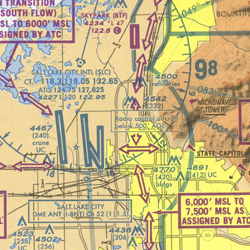
Example of an FAA Terminal Area Chart
FAA Terminal Area Chart More detailed chart for selected terminal areas.
Scale: 1:250,000

FAA Terminal Chart Information

FAA Chart Supplement

A VFR chart does not show every detail needed for an airport visit. The FAA Chart Supplement provides airport information such as runways, communications, services, and local procedures.

Check the current information for departure, destination, and possible diversion airports.

Official reference: FAA Chart Supplement.

Canada — VNC and VTA Charts

NAV CANADA publishes VFR Navigation Charts (VNC) at a scale of 1:500,000. They are used for visual cross-country navigation.

VFR Terminal Area Charts (VTA) provide more detail around selected busy terminal areas, at a scale of 1:250,000.

The Canada Flight Supplement (CFS) provides airport and operational information.

NAV CANADA VFR Publications

What Should You Look for on a VFR Chart?

Before using a chart for flight planning, make sure you can identify the following information.

Airspace and Airports

Identify airports, airspace boundaries, controlled airspace, and areas with special restrictions.

Terrain and Obstacles

Look for high terrain, towers, and other obstacles. Check charted elevations and obstacle heights.

Visual Landmarks

Find lakes, roads, towns, rivers, and other features that can help you recognize your position.

Training Insight — Learn the Chart Symbols

Use the chart legend and the FAA Aeronautical Chart Users' Guide to understand unfamiliar symbols, colors, and abbreviations.

FAA Aeronautical Chart Users' Guide

Aircraft Documents to Check Before Flight

Before departure, check the documents required for the aircraft and the planned operation. The list below also includes documents that become necessary for certain international or Canadian flights.

01
Certificate of Airworthiness

Confirms that the aircraft has the appropriate airworthiness approval. A valid certificate must be carried and displayed as required by U.S. regulations.

USA / CANADA
02
Certificate of Registration

Identifies the aircraft's registration. Check that the required registration document is valid and on board.

USA / CANADA
03
Aircraft Radio Station License

An individual FCC aircraft station license is normally not required for ordinary domestic flights in the U.S. It may be required for international operations.

Canadian aircraft must carry a radio license or copy when one has been issued for equipment operated on board.

INTERNATIONAL / WHEN APPLICABLE
04
Pilot's Operating Handbook (POH) / AFM

Provides approved operating information, limitations, procedures, and performance data. Carry or have available the manual and limitations required for your aircraft.

USA / CANADA
05
Weight and Balance Information

Use the aircraft's current weight and balance information to confirm that the planned loading remains within approved limits.

FLIGHT PREPARATION
06
Interception Procedures and Signals

Know how to recognize and respond to an interception. This is especially important for international operations.

Use the applicable interception procedures and required aeronautical publications. Do not assume a separate "Interceptor Order" document is mandatory for every domestic VFR flight.

INTERNATIONAL / WHEN APPLICABLE
07
Crew Licenses and Certificates

The pilot must have the required pilot certificate or license, medical qualification when applicable, and photo identification as required by the country of operation.

USA / CANADA
08
Proof of Insurance

Canada requires applicable liability insurance, and pilots operating in Canadian airspace must be able to provide the required proof.

Insurance requirements for U.S. domestic operations may differ.

CANADA / WHEN APPLICABLE
09
Journey Logbook

Under Canadian rules, the aircraft journey log is normally carried on board. An exception may apply when the aircraft is not planned to land and shut down anywhere other than its departure point.

A standard U.S. domestic training flight does not have the same general journey logbook carriage requirement.

CANADA
Important — Different Rules for Different Flights

This is a preparation checklist, not a universal list of documents that every aircraft must carry. Requirements depend on aircraft registration, the country of operation, and whether the flight is domestic or international.

Charts, navigation logs, and electronic flight bags are important planning tools. They do not replace required aircraft certificates or operating limitations.

Before Moving On

Know which aeronautical charts cover your planned route. Understand their basic symbols and confirm that the aircraft and pilot documents required for your flight are available.

Preflight Decision-Making

Weather, Airspace, and VFR Flight Planning

Before a VFR cross-country flight, check the weather along your route, review the airspace you may enter, and decide whether the flight can be completed safely.

Good weather at your departure airport does not guarantee suitable conditions everywhere. Weather can change during flight, especially near mountains, coastlines, and weather systems.

Weather Information for VFR Pilots

A weather briefing should include current conditions, forecasts, winds, and possible hazards. Use several sources rather than relying on a single report.

Current Conditions

METAR

A METAR reports observed weather at an airport. It may include wind, visibility, cloud conditions, temperature, dew point, and altimeter setting.

Airport Forecast

TAF

A Terminal Aerodrome Forecast describes expected weather near an airport during its forecast period. Check forecasts for departure, destination, and other relevant airports.

Enroute Forecast

Graphical Forecasts for Aviation

The FAA's Graphical Forecasts for Aviation help pilots review expected clouds, visibility, precipitation, and other weather conditions over a wider area.

Winds and Hazards

Winds Aloft and Advisories

Review forecast winds and temperatures at your planned altitude. Check relevant advisories for thunderstorms, icing, turbulence, and other hazards.

ATIS and NOTAMs

ATIS provides current airport information and local weather where the service is available. It is useful before departure and arrival.

NOTAMs provide time-sensitive operational information, such as runway closures, navigation facility outages, and other hazards. They are not weather forecasts.

Official weather source: Aviation Weather Center .

Check the Weather Along Your Route

Compare conditions at different points along your route and at the time you expect to reach them.

01
Departure Weather

Check wind, visibility, cloud ceiling, and runway conditions at your departure airport.

02
Enroute Weather

Review clouds, visibility, winds aloft, precipitation, and hazards across the route.

03
Destination Weather

Check expected conditions around arrival time. Consider whether the airport may become unsuitable.

04
Other Landing Options

Identify airports where you could land if the route or destination becomes unsafe.

Basic VFR Weather Minimums — United States

FAA weather minimums depend on airspace class, altitude, and sometimes day or night. SM means statute miles. The following table summarizes basic VFR requirements for airplanes.

Airspace Visibility Cloud clearance
Class B 3 SM Clear of clouds
Class C and D 3 SM 500 ft below / 1,000 ft above / 2,000 ft horizontal
Class E below 10,000 ft MSL 3 SM 500 / 1,000 / 2,000
Class E at or above 10,000 ft MSL 5 SM 1,000 ft below / 1,000 ft above / 1 SM horizontal
Class G at or below 1,200 ft AGL — Day 1 SM Clear of clouds
Class G at or below 1,200 ft AGL — Night 3 SM 500 / 1,000 / 2,000
Class G above 1,200 ft AGL and below 10,000 ft MSL — Day 1 SM 500 / 1,000 / 2,000
Class G above 1,200 ft AGL and below 10,000 ft MSL — Night 3 SM 500 / 1,000 / 2,000
Class G above 1,200 ft AGL and at or above 10,000 ft MSL 5 SM 1,000 ft below / 1,000 ft above / 1 SM horizontal

Visual Guide — FAA VFR Cloud Clearance

The diagrams below show the position of the airplane relative to the clouds. The vertical spaces in each diagram are proportional to the stated clearance values. Horizontal distances use a separate illustrative scale.

Class B — 3 SM and Clear of Clouds

In Class B airspace, remain clear of clouds with at least 3 statute miles of flight visibility. No fixed vertical or horizontal cloud separation is specified beyond remaining clear of clouds.

Class C, D, and E Below 10,000 ft MSL 3 SM visibility 500 ft 1,000 ft 2,000 ft HORIZONTAL Not to scale horizontally

500 ft below the cloud above, 1,000 ft above the cloud below, and 2,000 ft horizontally from clouds beside the airplane.

Class E at or Above 10,000 ft MSL 5 SM visibility 1,000 ft 1,000 ft 1 SM HORIZONTAL Not to scale horizontally

1,000 ft below the cloud above, 1,000 ft above the cloud below, and 1 statute mile horizontally from clouds beside the airplane.

Remember — Class G Has Different Rules

In Class G, visibility and cloud clearance change with altitude and time of day. At or below 1,200 feet AGL during the day, the basic airplane minimum is 1 SM and clear of clouds.

Important — Other FAA Rules May Apply

These are basic VFR minimums for airplanes. Additional conditions apply near certain airports, to student pilots, and to Special VFR operations. Class A does not permit ordinary VFR operations.

Official reference: 14 CFR § 91.155 .

Review the Airspace Before Departure

Your route may cross several airspace classes. Check communication, clearance, equipment, and weather requirements before selecting your route and altitude.

Controlled Airspace

Know the Entry Requirements

Identify Class B, C, D, and relevant Class E airspace along your route. Know when ATC communication or clearance is required.

Class B requires an explicit ATC clearance. Establishing radio communication alone is not sufficient.

Airspace Restrictions

Check for Special-Use Airspace

Identify prohibited, restricted, warning, and military operations areas. Check their status and applicable requirements.

Review temporary flight restrictions and relevant NOTAMs.

Make a Go/No-Go Decision

Legal weather minimums are only the starting point. Weather can meet the regulations but still be unsuitable for your experience, airplane, or route.

Training Insight — Personal Minimums

Set personal weather limits based on your training, recent experience, terrain, airplane, and instructor's guidance.

If conditions are close to your limits, delay, change, or cancel the flight.

Canada — VFR Weather Minimums Compared

Canadian and U.S. VFR rules use different altitude boundaries and cloud-clearance distances. Canada also has specific rules for VFR Over-the-Top (VFR OTT) flights.

Situation United States — FAA Canada — CARs
Controlled airspace — typical lower-altitude VFR Class C, D and E below 10,000 ft MSL: 3 SM visibility; 500 ft below, 1,000 ft above, 2,000 ft horizontal. 3 miles visibility; 500 ft vertically and 1 mile horizontally from clouds. Visual reference to the surface required.
Controlled airspace — Class B 3 SM visibility; clear of clouds. Canadian controlled-airspace VFR rules: 3 miles visibility; 500 ft vertically and 1 mile horizontally from clouds.
Uncontrolled airspace — low altitude, daytime Class G at or below 1,200 ft AGL: 1 SM visibility; clear of clouds. Below 1,000 ft AGL: normally 2 miles visibility for airplanes; clear of clouds.
Uncontrolled airspace — low altitude, night Class G at or below 1,200 ft AGL: 3 SM visibility; 500 / 1,000 / 2,000, subject to the airport-pattern exception. Below 1,000 ft AGL: 3 miles visibility; clear of clouds.
Uncontrolled airspace — higher altitude Class G above 1,200 ft AGL: minimums depend on altitude and day or night. At or above 1,000 ft AGL: 1 mile visibility by day, 3 miles at night; 500 ft vertically and 2,000 ft horizontally from clouds.
VFR Over-the-Top VFR flight above a cloud layer may be possible while meeting applicable VFR requirements. FAA "VFR-on-top" is a separate IFR clearance procedure. Specific VFR OTT privileges and conditions apply under CAR 602.116. Daytime cruise only; 5 SM flight visibility and at least 1,000 ft vertical cloud clearance.

In Canada, normal VFR flight in controlled airspace requires visual reference to the surface. VFR OTT is a separate operation that may allow flight above a cloud layer without visual reference to the ground.

Canada / CAR 602.116

VFR Over-the-Top (VFR OTT)

VFR Over-the-Top allows a qualified pilot to fly above a cloud layer during the daytime cruise portion of a flight, without keeping the ground in sight.

1,000 ft Minimum vertical distance from clouds
5,000 ft Minimum separation between two cloud layers
5 SM Minimum flight visibility at cruise altitude

Destination weather must also meet specific forecast requirements. These include no broken, overcast, or obscured cloud layer below 3,000 feet above the planned flight altitude, at least 5 miles of ground visibility, and no thunderstorms or precipitation.

For a destination TAF, the required forecast period extends from one hour before to two hours after the estimated arrival time. Different timing applies when an area forecast is used instead.

Canadian private pilots need the appropriate VFR OTT rating or other privileges that authorize this type of flight. VFR OTT is not permitted simply because the weather above the clouds is clear.

Official reference: CAR 602.116 — VFR OTT .

Canadian VFR regulations: CAR 602.114, CAR 602.115, and CAR 602.116.

Before Moving On — Is the Flight Safe?

Review current weather, forecasts, NOTAMs, airspace restrictions, VFR weather minimums, and available landing options. Make sure the conditions meet both the applicable regulations and your personal limits.

Aircraft Loading

Aircraft Weight and Balance

Before every flight, confirm that the airplane is within its approved weight and balance limits. An overloaded or incorrectly balanced airplane may be difficult to control and may not perform as expected.

Correct weight and balance means that the maximum allowable weight is not exceeded and the center of gravity (CG) remains within its approved limits. Both conditions must be satisfied.

Weight and balance illustration from the original StudyFlight lesson
Aircraft loading affects both total weight and center of gravity.

Understanding Weight and Center of Gravity

Aircraft Weight

Maximum Allowable Weight

The total aircraft weight includes the airplane, occupants, baggage, equipment, and fuel.

Make sure the planned takeoff and landing weights remain within the approved limits.

Aircraft Balance

Center of Gravity (CG)

The CG is the point at which the airplane's weight is considered to be concentrated.

Its position changes when passengers, baggage, or fuel are added, removed, or moved.

Weight, Arm, and Moment

Three values are used in a standard weight and balance calculation: weight, arm, and moment.

Weight is the load being carried. Arm is its distance from the aircraft's reference datum. Moment describes the turning effect of that weight around the datum.

Moment = Weight × Arm Multiply each weight by its arm.
CG = Total Moment ÷ Total Weight Divide the sum of moments by the total aircraft weight.

Worked Example — Calculate the CG

The following example uses hypothetical values in pounds and inches. It illustrates the calculation method, not the approved loading limits of a specific airplane.

Weight and Balance Worksheet
Item Weight (lb) Arm (in) Moment (lb-in)
Empty aircraft 1,500 40 60,000
Front occupants 340 37 12,580
Rear occupant 120 73 8,760
Baggage 40 95 3,800
Usable fuel (48 US gal) 288 48 13,824
Total 2,288 — 98,964

First, add all the weights and moments. Then calculate the CG position:

98,964 ÷ 2,288 CG = 43.25 in

The final step is to compare 2,288 lb and 43.25 in with the approved weight and CG envelope in the aircraft POH/AFM. A calculation alone does not establish that the loading is legal.

Remember — Fuel Changes Weight and Balance

Fuel is consumed during flight, reducing the aircraft's total weight. Depending on fuel tank locations and the aircraft design, the CG may also move.

Check the loading conditions required by your POH/AFM, including takeoff and landing.

Forward and Aft Center of Gravity

An aircraft may be within its maximum weight limit but have a CG that is too far forward or aft. Both situations can affect handling and flight safety.

Aft CG

Center of Gravity Too Far Aft

Aft center of gravity illustration

An aft CG generally reduces longitudinal stability. The airplane may feel more sensitive in pitch, and stall recovery can become more difficult.

Beyond the aft CG limit, sufficient nose-down elevator authority may not be available for safe recovery.

Forward CG

Center of Gravity Too Far Forward

Forward center of gravity illustration

A forward CG generally increases longitudinal stability but can require greater elevator control force.

Rotation and landing flare may become more difficult. A forward CG can also increase stall speed and reduce performance.

Never Fly Outside the Approved CG Limits

An airplane that is outside its approved CG envelope is not correctly loaded, even if its total weight is below the maximum allowable weight.

Adjust passenger seating, baggage, or fuel loading as permitted by the aircraft limitations before departure.

Final Weight and Balance Check

Before departure, complete these checks using the aircraft's current weight and balance records.

01
Determine the Aircraft's Empty Weight

Use the current aircraft records, including installed equipment.

02
Add the Planned Load

Include occupants, baggage, equipment, and fuel.

03
Calculate Total Weight and CG

Determine the total weight, total moment, and resulting CG.

04
Compare with Approved Limits

Confirm that the aircraft remains within the permitted weight and CG envelope for the required stages of flight.

Before Moving On

Always check both aircraft weight and center of gravity. Calculate the moments, determine the CG, and compare the result with the approved limits for your airplane.

VFR Navigation Preparation

Select Your Route and Navigation Checkpoints

Once you have reviewed the weather, aircraft documents, and weight and balance, the next step is to plan your route on a current VFR aeronautical chart.

Your goal is to select a practical route between two airports, recognize useful landmarks, identify airspace and terrain considerations, and divide the route into manageable navigation legs.

Our Example — A VFR Flight Across California

Navigation Training Scenario
Departure KMOD Modesto City–County Airport
→
Destination KFAT Fresno Yosemite International

We will use this flight as an example throughout the navigation planning process. The airports are real, but the route, selected checkpoints, and flight data must be verified on current charts.

This example follows the general direction of California's Central Valley. Towns, roads, and other recognizable features offer possible visual checkpoints.

Step 1 — Locate the Airports on Your Sectional Chart

Open the current FAA Sectional Chart covering your flight area. Find the departure airport, destination, and surrounding terrain.

Before drawing the route, review both airports' information in the Chart Supplement. Identify any nearby controlled airspace, special-use airspace, or other restrictions that could affect your route.

For Our Example

Find KMOD and KFAT on the current San Francisco Sectional Chart. Review the airspace surrounding both airports. Do not assume that a straight line between them is automatically an acceptable route.

Official resources: FAA VFR Charts and FAA Chart Supplement.

Step 2 — Select a Practical Route

Start by drawing a light straight line between your departure and destination airports. Then examine whether the route needs to be changed.

01
Identify Airspace Restrictions

Check controlled airspace boundaries, prohibited and restricted areas, military operations areas, and relevant temporary restrictions. Plan for the clearances, communication, and equipment required along the route.

02
Consider Terrain and Obstacles

Look for high terrain, towers, and other obstacles. Note the highest relevant elevations along each possible navigation leg.

03
Choose a Preliminary Cruising Altitude

Consider terrain clearance, airspace, expected clouds, and the direction of flight. Apply the relevant FAA altitude rules. Confirm the final altitude during aircraft performance planning.

04
Identify Possible Landing Airports

Locate airports along or near your route that could provide an alternative if you need to change your plans. Check their suitability and available services.

Plan the Route Before Calculating Headings

At this stage, you are choosing where you intend to fly. Do not calculate final magnetic headings or groundspeeds yet. These calculations require the selected track, aircraft performance, and forecast winds.

Step 3 — Choose Your Set Heading Point

A set heading point (SHP) is a recognizable position from which you begin following a planned navigation leg.

Instead of starting your cross-country timing immediately after takeoff, you can navigate to a clearly identifiable point, establish your planned heading, and begin tracking your progress from there.

Choosing a Good SHP

Look for a clear landmark outside the immediate airport traffic pattern, such as a distinctive road intersection, river crossing, or other charted feature. The point should be easy to recognize and compatible with local departure procedures and airspace requirements.

Step 4 — Select Visual Checkpoints

Checkpoints help you confirm that you are following your planned track. Choose features that are visible, easy to identify, and reasonably spaced along your route.

Roads and Railways

Major highways, railway junctions, and distinctive intersections can be useful references.

Towns and Airports

Recognizable towns and airfields can help establish your position. Check their exact charted locations.

Natural Features

Lakes, rivers, coastlines, reservoirs, and terrain features can provide strong visual references.

Possible Checkpoints — KMOD to KFAT

Examine Turlock, Merced, Madera, and the Highway 99 corridor as possible references. Their usefulness depends on the route you actually draw.

Do not force the airplane to fly directly over every town. Select checkpoints that support a safe, practical route and can be identified confidently from your intended altitude.

Step 5 — Draw the Route and Mark Your Checkpoints

Once the route is selected, draw the navigation legs on your chart. Use a ruler and a fine pencil or suitable digital planning tools.

Navigation chart preparation illustration from the original StudyFlight lesson
Mark the set heading point, navigation legs, checkpoints, and distance references on your navigation chart.
01
Draw the Line to the SHP

Mark your planned departure route from the airport to the set heading point.

02
Draw Each Navigation Leg

Connect the SHP to the next turning point or destination. Keep the route as simple as practical while considering airspace, terrain, and other restrictions.

03
Mark Distances and Checkpoints

Add distance references at suitable intervals, such as every 10 NM. Mark the midpoint of each leg and identify your selected checkpoints.

04
Add Drift Reference Lines

If using the paper-chart method, draw 10-degree drift lines from suitable reference points. These will help you recognize and estimate track errors during flight.

How to Mark a Navigation Leg SHP Turn point Midpoint Checkpoint 10° drift 10° drift

A simplified example of chart annotations. The blue line is the intended track, while the dashed lines illustrate 10-degree drift references. This drawing is not an aeronautical chart and is not intended for navigation.

Step 6 — Measure Distance and Determine True Course

For each planned navigation leg, measure the distance in nautical miles using the correct chart scale. A plotter can also be used to measure the true course.

The true course is the intended direction of the route measured clockwise from true north. Wind correction and magnetic variation will be applied later when calculating the actual heading to fly.

True Course Is Not Magnetic Heading

The line you draw on the chart gives your intended ground track. It does not automatically give the compass heading you will fly. Wind and magnetic effects must still be considered.

Step 7 — Prepare Your Route Information

Before moving to aircraft performance and wind calculations, record the basic information for each leg.

Route Information What to Record
Departure and destination KMOD and KFAT for this example
Set heading point Selected visual landmark near departure
Navigation legs Route segments and turning points
Checkpoints Recognizable visual references
Leg distances Measured nautical miles
True course Measured for each navigation leg
Terrain and obstacle information Minimum safe altitude considerations
Airspace and radio information Relevant requirements and frequencies
Other landing options Suitable airports along or near the route
Check Current Information Before Flight

Use current FAA aeronautical charts, airport information, NOTAMs, and applicable regulations. Check any restrictions and communication requirements affecting your chosen route.

The example route in this lesson is for training. Final tracks, distances, checkpoints, altitudes, and procedures must be established using current aeronautical information.

Before Moving On

You should now have a planned route showing your set heading point, turning points, visual checkpoints, leg distances, and true courses. You should also know the main airspace and terrain considerations.

The next step is to use this route to calculate aircraft performance, including takeoff, climb, cruise, descent, and landing.

Cross-Country Flight Planning

Calculate Aircraft Performance for Your Route

Your VFR route and checkpoints are now selected. The next step is to check whether your airplane can safely complete the planned flight under the expected conditions.

Use your aircraft's Pilot's Operating Handbook (POH) or Airplane Flight Manual (AFM) to determine takeoff, climb, cruise, descent, and landing performance.

Departure KMOD Modesto, California
→
Destination KFAT Fresno, California

We will continue using this California route throughout the lesson. The calculations shown below are training examples. Always use the performance charts and operating procedures for the specific airplane being flown.

01

Check Takeoff Performance

Begin at your departure airport. Determine whether your airplane can safely take off from the expected runway at KMOD.

Aircraft takeoff performance chart showing distance calculations
Example takeoff performance chart from the original StudyFlight lesson.
Information You Need

Takeoff weight, pressure altitude, temperature, wind component, runway slope, and surface condition.

What You Must Determine

Expected ground roll and total takeoff distance to clear the specified obstacle height, when provided by the POH/AFM.

Read the applicable takeoff performance chart. Interpolate between values and apply any corrections specified by the manufacturer.

Ground Roll Is Not Total Takeoff Distance

Ground roll is the distance traveled along the runway before liftoff. Total takeoff distance includes the distance required to reach the specified obstacle height, when that performance is published.

Compare the required takeoff distance with the runway distance available and allow an appropriate safety margin.

02

Calculate Time, Fuel, and Distance to Climb

After takeoff, the airplane must climb to your selected cruising altitude. Before departure, you need to know approximately how long this climb will take, how much fuel it will use, and how far the airplane will travel.

Time fuel and distance to climb table in an aircraft POH
Use the POH Time, Fuel, and Distance to Climb chart to estimate the climb under the expected conditions.
Example — Calculate Time, Fuel, and Distance to Climb

Imagine you are planning our VFR flight from Modesto (KMOD) to Fresno (KFAT).

Modesto is close to sea level, and you have selected a cruising altitude of 5,500 ft MSL. The exact calculation will depend on the airport's pressure altitude and the conditions expected on the day.

Before departure, answer three questions:
  • How many minutes will it take to reach cruising altitude?
  • How much fuel will the climb consume?
  • How many nautical miles will the airplane travel during the climb?

Step 1 — Understand the POH Climb Chart

Many aircraft POH climb charts provide cumulative time, fuel, and distance values from sea level to a specified pressure altitude.

This means that the figures shown at 5,500 ft can represent the entire climb from sea level to 5,500 ft, not just a portion of that climb.

Suppose the corrected POH chart for our hypothetical training airplane provides these values:

Pressure Altitude Total Time Total Fuel Total Distance
Sea level 0 min 0 gal 0 NM
5,500 ft 14 min 1.8 gal 18 NM

If the airplane were departing from sea-level pressure altitude, reaching 5,500 ft pressure altitude would take approximately 14 minutes, consume 1.8 gallons, and cover 18 NM, under the assumptions of this example.

14 min Time to climb Sea level to 5,500 ft
1.8 gal Fuel used Sea level to 5,500 ft
18 NM Distance to climb Under the chart assumptions

Step 2 — What If the Airport Is Above Sea Level?

Most airports are not exactly at sea level. If the chart gives cumulative values from sea level, you must remove the portion of the climb that would already have occurred below your departure pressure altitude.

For example, imagine you are departing from an airport with a pressure altitude of 1,000 ft and climbing to a pressure altitude of 5,500 ft.

The hypothetical chart gives:

Pressure Altitude Total Time from Sea Level Total Fuel from Sea Level Total Distance from Sea Level
1,000 ft 2 min 0.3 gal 2 NM
5,500 ft 14 min 1.8 gal 18 NM

You are not climbing from sea level. Your climb starts at 1,000 ft. Therefore, subtract the values at 1,000 ft from those at 5,500 ft.

1
Calculate Climb Time
14 min − 2 min = 12 min

The climb will take approximately 12 minutes.

2
Calculate Climb Fuel
1.8 gal − 0.3 gal = 1.5 gal

The climb will consume approximately 1.5 gallons.

3
Calculate Climb Distance
18 NM − 2 NM = 16 NM

The climb distance is approximately 16 NM under the chart assumptions.

12 min Climb time 14 − 2
1.5 gal Climb fuel 1.8 − 0.3
16 NM Climb distance 18 − 2

Step 3 — Apply This to Our Flight from KMOD

KMOD is at approximately 100 ft field elevation, which is close to sea level. However, field elevation is not necessarily the same as pressure altitude.

For the actual flight, determine the departure pressure altitude using the airport elevation and altimeter setting. Determine the cruise pressure altitude using the expected atmospheric conditions.

Then read or interpolate the appropriate values in the aircraft's climb chart, following the published instructions.

Step 4 — Record the Results

Once you have calculated the climb, keep the three values for the next stages of flight planning:

What Will These Values Be Used For?
  • Climb time: estimate when the airplane will reach cruising altitude.
  • Climb fuel: include fuel consumed during the climb in the flight's fuel plan.
  • Climb distance: estimate where along the route the airplane will reach cruising altitude.

The numbers above are hypothetical and do not come from the displayed POH chart. Use the specific aircraft data and apply all published corrections.

Climb Distance and Wind

Climb charts may use a particular wind assumption. A headwind reduces ground distance covered during a given climb time, while a tailwind increases it.

Follow the POH instructions and account for forecast winds before using climb distance in your navigation plan.

03

Determine Cruise Performance

Once the airplane reaches cruising altitude, you need to know its expected speed and fuel consumption at the selected power setting.

Aircraft cruise performance chart showing true airspeed and fuel consumption
Cruise performance chart from the original lesson. Use the figures corresponding to your airplane, selected altitude, power setting, and expected temperature.
True Airspeed (TAS)

True airspeed is the airplane's speed through the surrounding air.

You will combine TAS with forecast winds to calculate the expected groundspeed and heading for each navigation leg.

Cruise Fuel Flow (GPH)

Fuel flow is the amount of fuel the airplane consumes per hour at the selected cruise power setting, expressed in gallons per hour (GPH).

For example, 8 GPH means the airplane consumes approximately 8 gallons of fuel per hour at that power setting.

You will use this figure to calculate cruise fuel requirements once the enroute flight times are known.

For Our KMOD–KFAT Navigation

At this stage, record the TAS and cruise fuel flow from the POH. We are not calculating the final groundspeed yet, because that requires wind correction for the planned route.

04

Plan the Descent

Before arriving at KFAT, determine approximately when you should begin descending from cruising altitude.

A planned descent allows you to reach the appropriate arrival altitude without needing a rushed or unnecessarily steep descent.

Descent Time (min) = Altitude to Lose (ft) ÷ Average Descent Rate (ft/min)
Descent Distance (NM) = Descent Time (min) × Average Groundspeed (kt) ÷ 60
Example — Estimate Descent Distance

Suppose you need to lose 4,000 ft before reaching your planned arrival altitude.

You select an average descent rate of 500 ft/min, consistent with your airplane's operating guidance.

1
Calculate Descent Time
4,000 ÷ 500 = 8 minutes
2
Estimate Descent Distance

Assume an average descent groundspeed of 100 kt.

8 × 100 ÷ 60 = 13.3 NM

You would need approximately 13 NM to complete this descent under the assumed conditions.

This estimate does not include additional distance for arrival procedures, traffic sequencing, or maneuvering. Refine it using the expected wind, aircraft guidance, and planned arrival.

CLIMB CRUISE DESCENT KMOD KFAT

Simplified flight profile showing climb, cruise, and descent. Not drawn to scale.

05

Check Landing Performance

The final performance check concerns the destination airport. Use the aircraft's expected landing weight and the conditions forecast at KFAT.

Aircraft landing distance performance chart
Landing performance chart from the original StudyFlight lesson.
Landing Ground Roll

Determine the expected distance from touchdown to a complete stop under the specified chart conditions.

Total Landing Distance

Where published, determine the landing distance from the specified obstacle height to a complete stop.

Consider landing weight, pressure altitude, temperature, wind, runway slope, and runway surface condition. Apply the POH/AFM corrections and appropriate safety margins.

Confirm the Runway Is Suitable

Compare the calculated landing distance with the landing distance available. Higher weight, tailwind, high density altitude, and unfavorable runway conditions may increase the landing distance.

Record Your Aircraft Performance Data

At the end of this stage, collect the results that you will need when completing your navigation calculations.

Flight Phase Value to Record Source
Takeoff Ground roll and total takeoff distance POH/AFM takeoff chart
Climb Time, fuel, and distance to cruising altitude POH/AFM climb chart
Cruise True airspeed and fuel flow POH/AFM cruise chart
Descent Estimated descent time, ground distance, and fuel allowance Aircraft guidance, performance data, and planning calculations
Landing Landing ground roll and total landing distance POH/AFM landing chart
FAA Preflight Requirements

Under 14 CFR § 91.103 , pilots must become familiar with the available information concerning the planned flight, including applicable runway and performance information.

Before Moving On

You should now have checked takeoff and landing performance, calculated the expected climb, selected cruise TAS and fuel flow, and estimated the descent.

The next step is to combine your planned true courses, aircraft TAS, and forecast winds to calculate headings, groundspeeds, and estimated flight times for each navigation leg.

Cross-Country Navigation Calculations

Calculate Headings, Groundspeed, and Flight Times

You have drawn your route on the sectional chart and selected a cruising true airspeed (TAS) from your aircraft's performance data. Now you must calculate the heading to fly, the expected groundspeed, and the time required for each navigation leg.

Before using the E6B flight computer, review the navigation terms and speeds you will use during these calculations.

Navigation Terms — From Track to Heading

Track describes the direction of movement over the ground. Heading describes the direction the airplane's nose points. Wind can make the two directions different.

Order Navigation Term Definition Use in Flight Planning
1 True Course (TC) The direction of the intended ground track, measured clockwise from true north. Draw the route on the sectional chart and measure the true course.
2 True Heading (TH) The direction the airplane's nose points, measured clockwise from true north. Apply the wind correction angle to the true course.
3 Magnetic Variation The angular difference between true north and magnetic north. Use the charted variation to convert true directions to magnetic directions. Subtract east variation; add west variation.
4 Magnetic Course / Track A ground-track direction measured relative to magnetic north. Convert the true course to a magnetic course. This still describes the route, not the direction the nose points.
5 Magnetic Heading (MH) The direction the airplane's nose points, measured clockwise from magnetic north. Convert true heading using magnetic variation. This is the heading normally used with magnetic navigation references.
6 Compass Deviation Magnetic compass error caused by magnetic influences in the airplane. Use the aircraft's compass correction card.
7 Compass Heading (CH) The heading indication required on the aircraft's magnetic compass, after accounting for deviation. Use this indication when navigating by the magnetic compass.
True Track vs. True Heading

Imagine your planned true course is 150°. With no crosswind, your true heading may also be 150°.

If a crosswind pushes the airplane to the left, you must point its nose slightly to the right to remain on the planned ground track.

The actual track is the path the airplane really follows. It may differ from the planned course if your wind correction is inaccurate.

Navigation Speeds — IAS, CAS, TAS, and GS

These four speeds have different meanings. During navigation planning, the most important distinction is between true airspeed and groundspeed.

IAS Indicated Airspeed
CAS Calibrated Airspeed
TAS True Airspeed
GS Groundspeed
Order Speed Definition Use in Navigation
1 IAS — Indicated Airspeed The airspeed displayed on the airplane's airspeed indicator. Used to fly the airplane at the appropriate climb, cruise, or approach indicated airspeed.
2 CAS — Calibrated Airspeed IAS corrected for instrument and position errors. Use the aircraft's airspeed calibration chart when CAS is needed.
3 TAS — True Airspeed The airplane's speed relative to the surrounding air mass. Obtain TAS from the aircraft's performance data or appropriate airspeed corrections. Enter TAS into the E6B.
4 GS — Groundspeed The airplane's speed relative to the ground. Determine groundspeed using TAS and forecast wind. Use GS to calculate leg times and fuel consumption.
Which Speed Goes into the E6B?

Use TAS together with the forecast wind and true course. The E6B then gives you groundspeed and the wind correction angle.

Do not use indicated airspeed as groundspeed when calculating navigation times.

From Your Chart to the Compass

The navigation calculation follows this practical sequence:

True Course → Wind Correction → True Heading → Variation → Magnetic Heading → Deviation → Compass Heading

To calculate flight time, use a second sequence: TAS + Wind → E6B → GS → Time → Fuel.

Step 1 — Gather Your Navigation Data

We will continue planning our example cross-country flight from Modesto (KMOD) to Fresno (KFAT).

For this exercise, we will use one hypothetical navigation leg. These are practice values, not actual chart measurements or current weather forecasts.

Example — One Navigation Leg
150° True course
110 kt True airspeed
240° / 20 kt Wind from 240° true
36 NM Leg distance

We want to follow a true course of 150°. The wind comes from 240°, which is 90° to the right of the intended course. It will tend to push the airplane left.

We must calculate how much to turn into the wind and how fast the airplane will travel over the ground.

Step 2 — Use the Wind Side of the E6B

A mechanical E6B flight computer has a calculator side and a wind side. Turn it to the wind side, which has a rotating compass rose, a sliding grid, and speed arcs.

Mechanical E6B flight computer used for aviation navigation
Mechanical E6B flight computer. Use the wind side to determine wind correction angle and groundspeed.
Dave Faige (Cosmicship), via Wikimedia Commons, CC BY-SA 3.0. Image and license information .
01

Set Wind Direction

240°

Rotate the compass rose until 240°, the direction from which the wind blows, is under the TRUE INDEX.

02

Mark Wind Speed

20 kt

Locate the center hole (grommet). Using the speed scale, mark a pencil dot 20 kt above the grommet.

03

Set True Course

150°

Rotate the compass rose until 150°, your true course, appears under the TRUE INDEX.

04

Set True Airspeed

110 kt TAS

Slide the grid until the wind dot lies on the 110 kt true airspeed arc.

05

Read Wind Correction

About 10° right

Read the wind dot's position relative to the center line. The correction is approximately 10° right.

06

Read Groundspeed

About 108 kt

Without changing the setting, read the speed beneath the center grommet. This is the groundspeed.

E6B Result 1 10° Right

Wind correction angle. Point the nose into the wind.

E6B Result 2 108 kt

Expected groundspeed for this navigation leg.

Pilot Training Equipment

Practice Navigation with a Flight Computer

A mechanical E6B is a practical training tool for learning wind correction, groundspeed, flight time, and fuel calculations. Explore mechanical and electronic flight computers at PilotMall.

Explore Flight Computers

Step 3 — Calculate True Heading

The E6B gives a wind correction angle of approximately 10° right. Add this correction to the true course.

True Heading = True Course + Right WCA
150° + 10° = 160° True Heading

You should plan to fly approximately 160° true heading to maintain the intended 150° ground track.

Always Correct Into the Wind

A wind from the right requires a right wind correction. A wind from the left requires a left wind correction.

Use the E6B to determine both the size and direction of the required correction.

Step 4 — Convert True Heading to Magnetic Heading

True north and magnetic north are not in exactly the same direction. The angular difference is called magnetic variation.

Find the applicable magnetic variation on your current aeronautical chart.

Easterly Variation

Subtract east variation from true heading.

True − East = Magnetic
Westerly Variation

Add west variation to true heading.

True + West = Magnetic
Example — Magnetic Heading

Suppose the applicable magnetic variation is 13° east. This is a hypothetical example value, not a current chart reading for KMOD–KFAT.

160° − 13° = 147° Magnetic Heading

The calculated magnetic heading is approximately 147°.

Step 5 — Apply Compass Deviation

Magnetic influences inside the aircraft can affect the magnetic compass. The resulting error is called compass deviation.

Read the aircraft's compass correction card to determine the correct compass indication for the desired magnetic heading.

Example — Compass Heading

Suppose the aircraft's compass card shows that a desired magnetic heading of 147° requires a compass indication of 149°.

Magnetic Heading 147° → Compass Heading 149°

This is a hypothetical correction. Always use the actual compass card of the aircraft being flown.

Step 6 — Calculate Estimated Time Enroute

The E6B has already given you a groundspeed of approximately 108 kt. You can now calculate the time needed to fly the 36 NM leg.

Example — Flight Time
36 NM Leg distance
108 kt Groundspeed
20 min Estimated time
8 GPH Example fuel flow

Use the calculator side of the E6B or the basic time-distance calculation.

Time (min) = Distance (NM) ÷ GS (kt) × 60
36 ÷ 108 × 60 = 20 minutes

The estimated time enroute for this leg is 20 minutes.

Step 7 — Calculate Cruise Fuel for the Leg

Use the expected cruise fuel flow obtained from the aircraft's POH/AFM during performance planning.

For this example, suppose the airplane uses 8.0 gallons per hour at the chosen cruise setting.

Fuel Used = Time (min) ÷ 60 × Fuel Flow (GPH)
20 ÷ 60 × 8.0 = 2.67 gallons

The estimated cruise fuel consumption is approximately 2.7 gallons.

Cruise Fuel Is Not Total Flight Fuel

This calculation covers only the example cruise leg. Total flight planning must also account for other flight phases, applicable legal fuel reserves, and appropriate additional margins.

Record Your Navigation Calculations

Repeat the E6B procedure for each leg of the planned route. A different true course may produce a different wind correction, heading, and groundspeed.

Navigation Item Example Result Source or Method
True Course 150° Hypothetical chart measurement
Leg Distance 36 NM Hypothetical chart measurement
True Airspeed 110 kt Hypothetical aircraft performance
Forecast Wind 240° / 20 kt Hypothetical true wind forecast
Wind Correction Angle 10° right E6B wind side, rounded
Groundspeed 108 kt E6B wind side, rounded
True Heading 160° 150° + 10°
Magnetic Variation 13° east Hypothetical chart value
Magnetic Heading 147° 160° − 13°
Compass Heading 149° Hypothetical compass card
Estimated Time 20 min 36 NM at 108 kt
Estimated Cruise Fuel 2.7 gal 20 minutes at 8 GPH
Recommended FAA Navigation Reference

The FAA Pilot's Handbook of Aeronautical Knowledge is an essential reference for student pilots. It covers pilotage, dead reckoning, wind correction, magnetic variation, and cross-country flight planning.

Before Moving On

For each navigation leg, you should now know the intended true course, wind correction angle, true heading, magnetic heading, compass heading, expected groundspeed, estimated time, and cruise fuel consumption.

In the next chapter, we will transfer these values into the VFR Flight Planner, together with the selected checkpoints, climb and descent calculations, and fuel reserves.

Cross-Country Flight Planning

Complete Your VFR Flight Planner

You have selected your route, identified visual checkpoints, checked aircraft performance, and calculated headings and groundspeeds. Now bring this information together in a VFR navigation log or flight planner.

A completed navigation log helps you follow your planned route, check progress, update estimated arrival times, and monitor fuel during the flight.

Departure KMOD Modesto
→
Destination KFAT Fresno
What Is a VFR Flight Planner?

A VFR navigation log is your working document for the flight. It normally includes route legs, checkpoints, true courses, headings, distances, groundspeeds, flight times, and fuel estimates.

Different flight-planning forms may arrange these items in different columns, but the planning method remains the same.

Start with the Flight Planner

The original StudyFlight lesson includes the following flight-planning illustration. Use it as a visual reference while organizing your calculations.

Original StudyFlight navigation preparation and flight planning illustration
Original flight-planning illustration from the StudyFlight Pilot Navigation lesson.

Step 1 — Enter Your Route and Checkpoints

Begin with the route you selected on your sectional chart. Enter your departure airport, destination airport, and each intermediate checkpoint in the order you expect to pass them.

01

Departure

Record KMOD, the intended runway, departure procedures, and your set heading point (SHP), if used.

02

Enroute Checkpoints

Enter recognizable landmarks, towns, roads, or other checkpoints verified on your current chart.

03

Leg Distances

Measure the distance between consecutive checkpoints in nautical miles (NM).

04

Destination

Record KFAT, the intended arrival information, and appropriate alternate landing options.

Use Your Actual Chart Measurements

The numbers in the examples below are hypothetical. They are not measured distances or verified flight-planning data for KMOD–KFAT.

Do not transfer them directly into a real navigation log.

Step 2 — Transfer Your Heading Calculations

For each planned leg, transfer the results calculated with the E6B in the previous chapter.

Navigation Log Column What to Enter Where It Comes From
TC True Course Measured on the sectional chart
WCA Wind Correction Angle E6B wind side
TH True Heading TC corrected for wind
VAR Magnetic Variation Current aeronautical chart
MH Magnetic Heading TH corrected for variation
CH Compass Heading, if recorded Aircraft compass correction card
GS Groundspeed E6B calculation
Example — Transfer One Calculated Leg

In the previous chapter, we calculated a hypothetical leg using the following values.

36 NM Distance
160° True heading
108 kt Groundspeed
TC WCA TH VAR MH GS
150° 10° R 160° 13° E 147° 108 kt

The magnetic variation is illustrative. For an actual flight, use the variation shown on your current chart.

Step 3 — Enter Estimated Time for Each Leg

Use the planned distance and groundspeed to calculate estimated time enroute (ETE). The result tells you how long it should take to reach the next checkpoint.

ETE (min) = Distance (NM) ÷ GS (kt) × 60
Example — One Cruise Leg

Our example cruise leg is 36 NM long, with a planned groundspeed of 108 kt.

36 ÷ 108 × 60 = 20 minutes

Enter 20 min as the planned ETE for this leg.

Repeat the calculation for each leg using its own distance and groundspeed.

Step 4 — Account for Climb, Cruise, and Descent

Your entire flight is not conducted at cruising altitude. Before calculating total flight time and fuel, account for the climb and descent phases.

Use the climb data obtained from the POH, your calculated cruise-leg information, and your planned descent.

Example — Three Flight Phases

Suppose the hypothetical airplane has the following performance estimates. These figures are for learning the method, not an actual KMOD–KFAT flight.

Flight Phase Time Fuel Distance
Climb 14 min 1.8 gal 18 NM
Cruise 20 min 2.7 gal 36 NM
Descent 8 min 0.8 gal 13 NM
Flight Total 42 min 5.3 gal 67 NM

The example assumes that the 36 NM leg represents the cruise portion and that the climb and descent occur outside that cruise segment.

For your actual route, use the distances measured on the chart. Avoid counting climb or descent distance twice. The descent fuel allowance is hypothetical and must be replaced by appropriate aircraft performance data.

42 min Estimated flying time
5.3 gal Estimated flight fuel
67 NM Illustrative route distance

Step 5 — Calculate Estimated Departure and Arrival Times

Once you know the total estimated flight time, you can calculate the expected arrival time (ETA).

Use the planned takeoff time when calculating flight time from takeoff to landing. If your planner uses departure from parking, account separately for taxi and other ground operations.

Example — Estimated Arrival Time

Assume the airplane takes off at 10:00 local time and the estimated flying time is 42 minutes.

10:00 + 42 minutes = 10:42

The estimated arrival time is 10:42 local time.

During the flight, compare actual checkpoint times with planned times and update your ETA if necessary.

Step 6 — Calculate Total Fuel Requirements

Fuel planning must cover the expected flight and provide sufficient fuel for the required legal reserve, together with appropriate additional margins.

For a typical U.S. VFR airplane operation, 14 CFR § 91.151 requires enough fuel to reach the first intended landing point and then fly at normal cruising speed for at least:

30 min Day VFR fuel reserve
45 min Night VFR fuel reserve
Extra Additional planning margin
Fuel Reserves Are Time-Based

The legal requirement is expressed as additional flying time at normal cruising speed, not as a fixed number of gallons for every aircraft.

Convert the required time into fuel using the relevant cruise fuel consumption. More restrictive operating requirements may also apply.

Example — Day VFR Fuel Plan

Continue with our hypothetical aircraft. Assume a cruise fuel flow of 8.0 GPH and a planned flight fuel requirement of 5.3 gallons.

Fuel Item Calculation Fuel
Climb From performance planning 1.8 gal
Cruise 20 min at 8.0 GPH 2.7 gal
Descent Illustrative allowance 0.8 gal
Taxi and Ground Operations Illustrative allowance 0.5 gal
Day VFR Reserve 30 min at 8.0 GPH 4.0 gal
Additional Margin Example: 20% of planned trip fuel (5.8 gal) 1.2 gal
Total Planned Fuel 5.8 + 4.0 + 1.2 11.0 gal

In this example, we need 11.0 gallons of usable fuel for the planned trip, day VFR reserve, and additional margin.

The 20% contingency is an additional planning choice, not the FAA minimum reserve requirement. It does not replace the 30-minute day VFR reserve.

Verify Actual Usable Fuel

Compare your total planned fuel requirement with the usable fuel available in the aircraft. Account for the actual fuel on board, aircraft limitations, and weight and balance.

If the planned route, winds, destination weather, or fuel requirements make the flight unsuitable, revise the plan before departure.

Step 7 — Add Frequencies and Airport Information

Your navigation log should also make it easy to find the information needed during the departure, enroute, and arrival phases.

Departure Airport

Relevant ATIS or AWOS information, clearance delivery where applicable, ground, tower, and departure frequencies.

Enroute

Relevant airspace boundaries, communication frequencies, checkpoints, and suitable landing options.

Destination Airport

Arrival frequencies, airport information, expected runway, and applicable arrival procedures.

Alternate Options

Suitable airports or landing options along the route, their limitations, and relevant contact information.

Verify airport information using current charts, NOTAMs, and the FAA Chart Supplement. Do not rely on frequencies or airport data copied from an old example.

Step 8 — Review the Completed Navigation Log

Before departure, check that the route, aircraft performance, weather, and navigation calculations agree.

Planning Item Final Check
Route and Checkpoints Verified on current charts
Airspace and Terrain Route and altitude appropriate
Weather and NOTAMs Current briefing reviewed
Weight and Balance Within aircraft limitations
Takeoff and Landing Performance Suitable for expected conditions
Headings and Groundspeeds Calculated for each navigation leg
Flight Times and ETA Calculated and recorded
Fuel Trip fuel, legal reserves, and margins checked
Frequencies and Airports Current information available

Step 9 — File and Activate a VFR Flight Plan

Completing your personal navigation log does not mean you have filed a VFR flight plan with Flight Service.

For VFR operations in the United States, the FAA strongly recommends filing a VFR flight plan to support search and rescue services. A filed plan must be activated to receive those services.

01

File

Submit the VFR flight plan through an appropriate Flight Service or authorized filing method.

02

Activate

Open the flight plan using an appropriate method when the flight begins.

03

Update

Report significant changes when required, including changes affecting the filed plan.

04

Close

Close your active VFR flight plan after landing. An active plan does not automatically close when you arrive.

Filing Is Separate from ATC Services

Receiving ATC flight following is not the same as having an active VFR flight plan. Follow current FAA procedures for filing, activating, and closing a VFR flight plan.

See FAA AIM Chapter 5, Section 1 for flight plan procedures.

Your VFR Flight Planner Is Ready

Your navigation log should now contain the route, visual checkpoints, charted courses, calculated headings, groundspeeds, estimated times, aircraft performance, fuel planning, and relevant frequencies.

Next, we will move from flight planning to flying the route: departure procedures, the set heading point, checkpoint identification, and enroute navigation.

VFR Cross-Country Flight Procedures

Departure and Enroute Navigation

Your navigation log is complete. You have calculated the headings, groundspeeds, checkpoint times, and fuel requirements for your planned flight.

Now you must use that plan in the airplane. Successful pilot navigation requires more than following a heading: you must identify your position, confirm your ground track, monitor your progress, and adjust the plan when conditions change.

Departure KMOD Modesto
→
Destination KFAT Fresno

1. Choose Your Departure Method

Before takeoff, decide how you will join your planned navigation route. The original StudyFlight lesson describes three common techniques: overhead departure, enroute climb, and departure via a set heading point.

The appropriate method depends on the airport, departure instructions, terrain, airspace, weather, and available visual references.

Method 1

Overhead Departure

After departure, maneuver as permitted to establish the planned track near or over the departure airport.

Advantage

The airport provides a recognizable position reference, particularly in unfamiliar terrain.

Limitation

Additional maneuvering increases flight time and fuel consumption. Airport traffic and ATC instructions may make this technique inappropriate.

Method 2

Enroute Climb

After takeoff, climb while joining the intended route as permitted by terrain clearance and ATC.

Advantage

Often provides a direct transition from departure to the planned route.

Limitation

The pilot must manage the climb and track interception together. It is possible to overshoot the intended track.

Which Method Should You Use?

For our KMOD–KFAT example, we will demonstrate the Set Heading Point method.

The actual SHP must be selected and verified on your current sectional chart before the flight. We are not assuming that an arbitrary landmark near Modesto is suitable.

ATC and Safe Departure Procedures Come First

KMOD is a towered airport. Follow applicable clearances, instructions, runway departure procedures, and airspace requirements.

Do not maneuver overhead, turn toward a checkpoint, or begin a navigation leg in conflict with ATC instructions or safe obstacle clearance.

2. Prepare for Takeoff

Before departure, ensure that the navigation log and chart are ready for use. Review the intended departure, initial heading, airspace boundaries, and first checkpoint.

Navigation Log

Keep the initial heading, checkpoint sequence, leg times, and frequencies accessible.

Chart and Position

Identify the departure airport, planned SHP, first route leg, and nearby airspace.

Aircraft Instruments

Set the appropriate altimeter setting. Check heading references according to aircraft procedures.

Departure Briefing

Review the intended departure, expected climb, weather, terrain, and actions if the route cannot be followed.

3. Complete the Set Heading Procedure

Once safely established after departure, proceed toward the chosen set heading point, consistent with the departure clearance and flight conditions.

At the SHP, confirm your position, establish the planned heading, and begin timing the navigation leg.

01

Confirm Your Position

Positively identify the selected set heading point and confirm that it matches the chart.

02

Check Heading Instruments

Verify the heading indication against the magnetic compass as appropriate for your aircraft, allowing for known compass errors.

03

Record SHP Time

Note the time you pass the set heading point. Use it as the start time for the next planned leg.

04

Establish Planned Heading

Turn to the calculated heading when safe and permitted. Confirm that the aircraft begins following the intended ground track.

05

Complete Cruise Setup

At the appropriate altitude, establish cruise power and configure the aircraft according to its POH/AFM, including mixture procedures where applicable.

06

Check Track and ETA

Compare the observed track with the charted route. Check progress toward the first checkpoint and review the ETA.

Example — Starting Your Navigation Log

Suppose you pass your selected set heading point at 10:08 local time.

Your planned ETE to the next checkpoint is 12 minutes.

10:08 Time over SHP
12 min Planned leg time
10:20 Estimated checkpoint time
10:08 + 12 minutes = 10:20

Record 10:20 as the estimated time over the next checkpoint.

These times are illustrative, not actual timings for KMOD–KFAT.

4. Maintain Your Planned Track

Once established on the route, maintain the planned heading while confirming the aircraft's actual progress using recognizable visual references.

A heading alone does not confirm that the airplane is following the planned track. Wind may change, and the aircraft may drift away from the charted route.

Keep the Chart Oriented

Position the chart so the direction of travel is easy to visualize. Compare features on the map with the terrain outside.

Identify Landmarks

Use towns, major highways, rivers, airports, and other charted features to confirm your position.

Monitor Heading References

Recheck the heading indicator against the magnetic compass at suitable intervals, following aircraft procedures.

Observe Ground Track

Compare your actual position with the intended chart line. If you are off track, determine an appropriate correction.

Pilotage and Dead Reckoning Work Together

Pilotage uses visible ground references to establish position. Dead reckoning estimates position from heading, groundspeed, and elapsed time.

During a VFR cross-country flight, compare your dead-reckoning position with positively identified visual checkpoints.

Suitable electronic navigation equipment can provide an additional cross-check, but does not replace the need to maintain situational awareness.

5. Update Your ETA at Each Checkpoint

Each checkpoint gives you an opportunity to compare your planned progress with the actual flight.

Record the actual time over a positively identified checkpoint. If the actual leg time differs from the estimated time, assess whether the wind or groundspeed differs from your plan.

Example — Your First Checkpoint Is Late

You departed the SHP at 10:08. You expected to reach the next checkpoint at 10:20, but you actually reached it at 10:22.

12 min Planned leg time
14 min Actual leg time
2 min Behind schedule

The actual leg took two minutes longer than planned. Suppose its charted distance was 21 NM.

Actual GS = 21 NM ÷ 14 min × 60
Actual GS = 90 kt

You can now use the observed groundspeed as one input when estimating the next checkpoint time.

For example, if the next leg is 18 NM and you estimate a groundspeed of 90 kt:

18 ÷ 90 × 60 = 12 minutes
10:22 + 12 minutes = 10:34

Your revised ETA for the next checkpoint would be 10:34.

Do Not Assume Groundspeed Is Constant

A different course may produce a different wind component. The observed groundspeed on one leg should not automatically be used for every remaining leg.

Reassess the expected wind and use the appropriate groundspeed for each segment.

6. Keep Your Navigation Log Updated

Your flight planner becomes a record of actual flight progress. Update it each time you confirm a checkpoint or revise an estimate.

Checkpoint Planned Time Actual Time Next ETA
Set Heading Point 10:08 10:08 10:20
Checkpoint 1 10:20 10:22 10:34 revised
Checkpoint 2 10:34 revised Record in flight Calculate from actual progress

This is a simplified timing example. In a complete navigation log, you should also monitor headings, fuel remaining, actual progress, and any required route changes.

7. Perform Regular Enroute Checks

Navigation is only one part of managing the flight. Continue normal aircraft checks and maintain awareness of changing conditions.

Aircraft Systems

Monitor engine instruments, fuel indications, aircraft performance, and any checklist items required during cruise.

Weather

Compare observed weather with the preflight forecast. Obtain updated weather information when appropriate and available.

Communications

Monitor the appropriate ATC or advisory frequency and comply with applicable communication requirements.

Terrain and Landing Options

Continue scanning for terrain, obstacles, nearby airports, and suitable emergency landing options.

Prioritize Flying the Airplane

Use the principle: Aviate, Navigate, Communicate.

Maintain aircraft control and situational awareness before making detailed log entries or recalculating flight estimates.

8. Prepare for Descent and Arrival

As you approach KFAT, use the descent planning completed in the aircraft performance chapter. Confirm the destination weather, expected runway, available airport information, and relevant ATC instructions.

01

Review Arrival Information

Obtain current destination weather and the appropriate airport and ATC information.

02

Complete Descent Checks

Secure the cabin, review aircraft configuration, and follow the applicable descent checklist.

03

Start the Planned Descent

Descend according to the aircraft operating guidance, terrain clearance, airspace restrictions, and ATC instructions.

04

Contact ATC

Establish the required communication with the appropriate approach or tower facility and follow instructions.

05

Join the Arrival

Follow the appropriate arrival and traffic-pattern instructions, complete landing checks, and land.

06

Close the VFR Flight Plan

If you activated a VFR flight plan, ensure it is properly closed after landing using an appropriate Flight Service method.

Arrival Procedures Are Airport-Specific

Do not assume a standard traffic-pattern entry or a fixed descent rate at every airport.

Follow the applicable airport procedures, aircraft checklists, and ATC instructions.

An active VFR flight plan is not automatically closed simply because the airplane has landed.

9. Review the Enroute Navigation Sequence

The following table summarizes the chronological flow of a typical VFR cross-country flight.

Flight Phase Navigation Task What to Record or Verify
Before Takeoff Brief departure and route Initial heading, SHP, airspace
Departure Climb and follow departure instructions Aircraft position and safe route
Set Heading Point Establish planned heading and timing Time over SHP, initial ETA
First Navigation Leg Maintain and verify ground track Heading, observed landmarks
Each Checkpoint Confirm position and progress Actual time, revised ETA
Enroute Cruise Monitor airplane, fuel, weather, and airspace Remaining fuel and conditions
Descent Prepare aircraft and arrival Altitude, position, ATC instructions
Landing Complete arrival and close active VFR flight plan Arrival and flight plan status
From Flight Planning to Actual Navigation

A navigation plan is only useful if you continuously compare it with what is happening during the flight.

Start from a known position, establish the planned heading, identify visual checkpoints, monitor elapsed time and groundspeed, and update the navigation log as conditions change.

In the next section, we will study how to correct a track error when the airplane drifts away from the planned route, including the opening and closing angle method and the double track error method.

VFR Cross-Country Navigation

Correcting Track Errors and Wind Drift

You are flying your planned navigation leg and checking your position against the sectional chart. Suddenly, you notice that the airplane is not following the route you drew.

This is a track error. It may result from an incorrect heading, changing wind, an inaccurate wind correction, or an error in maintaining the planned heading.

Before making a correction, answer three questions:

Where am I? Identify your actual position using reliable visual references.

Where should I be? Compare your position with the planned line on your chart.

How should I correct? Choose a suitable technique based on your position and the remaining distance.

Understanding Track Error

Remember that heading is the direction the airplane's nose points, while track is the direction the airplane actually travels over the ground.

When the wind correction is incorrect, the airplane can drift to one side even while the pilot maintains a constant heading.

Example — Left of Track

Suppose your planned magnetic heading is 150°, but you discover that the airplane is drifting to the left of the route.

To correct this deviation, you need a heading change to the right. The amount depends on whether you want to regain the original track or proceed directly to a future point.

Choosing a Track Correction Method

The original StudyFlight lesson introduces three practical methods. Each answers a slightly different navigation problem.

Method 1

Visual Alteration

Navigate toward a clearly identified landmark on your planned track, then resume navigation from that known position.

Method 2

Double Track Error

When still sufficiently early in the leg, use approximately twice the observed track error to intercept the original track.

Method 3

Opening and Closing Angles

When continuing toward a destination or checkpoint is more practical than returning to the original track, use opening and closing angles.

Method 1 — Visual Alteration

Visual alteration is the most intuitive of the three methods. Instead of calculating an exact angle, you use a prominent visual reference to regain a known position.

01

Identify Your Position

Locate the airplane using two or more recognizable charted landmarks when possible.

02

Select a Landmark

Choose a suitable, clearly identifiable feature on or near the intended track.

03

Rejoin and Continue

Navigate to the selected reference when safe, then resume the planned route with an appropriate heading and wind correction.

Example — Using a Town as a Reference

During the KMOD–KFAT exercise, suppose you recognize a town that is clearly marked on the current sectional chart.

You confirm your position and select a suitable charted feature along the route. If safe and appropriate, navigate toward that feature.

Once positively overhead or abeam the selected reference, update your position, heading, time, and next checkpoint ETA.

Do Not Chase an Unidentified Landmark

Visual alteration requires positive identification. A feature that merely resembles something on the chart is not enough to establish position.

Any revised track must also respect terrain, obstacles, airspace, and ATC instructions.

Method 2 — Double Track Error

The double track error method is used to regain the original planned track during the early part of a navigation leg.

It is based on a simple principle: if the airplane has moved away from the intended track at a certain angle, approximately twice that angle in the opposite direction can bring it back to the track over a similar period of time.

StudyFlight diagram illustrating the double track error method
Double Track Error method: use an intercept heading to regain the planned route, then adjust to maintain the track.
Example — Five Degrees Left of Track

Imagine you are in the early part of a navigation leg. Your planned magnetic heading is 150°.

By comparing your position with the chart and the 10° drift reference lines, you estimate a 5° track error to the left.

150° Original heading
5° Left Estimated track error
10° Right Intercept correction

First — Double the Error

5° × 2 = 10°

Because you are left of track, turn to the right.

150° + 10° = 160°

Fly approximately 160° magnetic while monitoring your position relative to the original route.

Next — Regain the Planned Track

Under the simplified assumptions of this method, the time required to regain the track is approximately equal to the time spent drifting away.

However, do not turn solely because that amount of time has passed. Confirm the intercept using charted landmarks or appropriate navigation equipment.

Finally — Maintain the Track

Once the airplane has regained the planned track, remove the additional intercept correction.

160° − 5° = 155°

In this simplified example, 155° magnetic is the estimated corrected heading to maintain the intended track.

Continue checking the actual ground track and refine the heading as necessary.

Why Does Double Track Error Work?

The original 5° error has already carried the airplane away from the intended route.

The 10° heading change is intended to both counter the estimated drift and create an approximately equal angle back toward the route.

After interception, only the estimated 5° wind correction remains necessary.

Use This Technique Early in the Leg

The traditional double track error method is most useful before the halfway point, when enough distance remains to regain the original track.

It is an approximation. Changing winds, varying groundspeed, or inaccurate position estimates can affect the result.

Method 3 — Opening and Closing Angles

If you discover the error later in the navigation leg, returning to the original track may be inefficient.

Instead, you may decide to proceed directly toward the next positively identified checkpoint or destination.

The opening and closing angle method uses your position relative to the planned route to estimate the heading correction.

StudyFlight diagram illustrating opening and closing angles
Opening and Closing Angles: estimate how far the airplane has departed from the original track and how much additional correction is needed to proceed toward the destination.
01

Locate Your Position

Positively determine where the airplane is in relation to the intended track and remaining destination.

02

Estimate Opening Angle

Use the chart's drift reference lines to estimate the angle between the planned track and your actual position relative to the departure point.

03

Estimate Closing Angle

Determine the angle needed to turn from your present position toward the intended destination or checkpoint.

Example — Continue Toward Your Destination

You discover that you are left of the planned route, and you are already beyond the halfway point.

Using the chart, you estimate:

5° Opening angle
8° Closing angle
13° Total correction
5° + 8° = 13°

Since you are left of the route, the correction is to the right.

In the simplified method used in the original lesson, if your current reference heading is 150°:

150° + 13° = 163°

The estimated heading becomes 163°. This example assumes that the opening angle represents the accumulated drift relative to the existing heading.

In an actual flight, independently verify the bearing from your present position to the intended point and account for the expected wind.

Opening vs. Closing Angle

The opening angle describes how far the actual path has diverged from the planned track.

The closing angle describes the additional turn needed to aim from the present position toward the intended point.

Unlike double track error, the goal is not necessarily to rejoin the original track before reaching the destination.

Using 10° Drift Lines

When preparing a paper navigation chart, pilots may draw reference lines at 10° to either side of the planned course.

These lines provide a visual scale for estimating how far the airplane has drifted from the intended route.

01

Mark the Route

Draw the intended navigation leg between the selected departure reference and its destination.

02

Draw 10° References

From the departure point, draw lines 10° to the left and right of the intended track.

03

Estimate the Error

Compare your positively identified position with the reference lines to estimate the opening angle.

For the opening and closing angle method, additional 10° references from the destination point can help estimate the closing angle.

Use Drift Lines as an Estimate

The 10° lines are a chart-based visual aid, not a substitute for accurate position fixing.

Their usefulness depends on chart accuracy, leg length, and your ability to identify the airplane's actual position.

Compare the Three Methods

Method When to Use It Main Action Result
Visual Alteration A suitable, positively identified landmark is available Navigate toward the chosen reference Resume from a known position
Double Track Error Sufficient distance remains, generally before halfway Double the estimated error, intercept the original track, then reduce the correction Regain the planned track
Opening and Closing Angles Later in the leg, when continuing directly is preferable Estimate opening and closing angles and correct toward the destination Proceed toward the intended point without necessarily returning to the original track

After Correcting the Track

Every significant track correction may change your expected flight time and fuel consumption. Update your navigation log after establishing the revised route.

01

Confirm Position

Verify the airplane's position using visual references or suitable navigation equipment.

02

Recalculate ETA

Estimate the remaining distance and groundspeed, then calculate a revised checkpoint or arrival time.

03

Check Fuel and Airspace

Ensure the revised route remains suitable for the available fuel, terrain, weather, and airspace.

Cross-Check with Available Navigation Equipment

When properly used, GPS or other available navigation equipment can help verify the airplane's position and actual ground track.

Maintain awareness of the terrain, airspace, and visual references. Do not allow calculations or chart work to distract from flying the airplane.

Key Takeaways

If you drift off your planned route, first establish your actual position. Then choose the most suitable correction technique.

Use visual alteration to navigate toward a known landmark, double track error to regain your route early in a leg, or opening and closing angles to proceed toward the destination when returning to the original track is unnecessary.

In the next section, we will examine diversions and lost procedures: what to do when continuing the original navigation plan is no longer appropriate.

VFR Cross-Country Navigation

Diversions and Lost Procedures

Even with careful flight planning, you may need to change your route or destination during a VFR flight. Deteriorating weather, unexpected fuel consumption, or aircraft problems can make continuing the original flight inappropriate.

You may also encounter a different problem: you can no longer identify your position with enough confidence to continue normal navigation.

Diversion: You know where you are, but decide to navigate to a different destination.

Lost procedure: You cannot determine your position reliably and must re-establish it or request assistance.

In both situations, maintaining aircraft control and a safe flight path comes first.

When Should You Divert?

A diversion is a planned change to your original route or destination. It should be considered before changing conditions become an emergency.

Deteriorating Weather

Lowering clouds, reduced visibility, thunderstorms, or conditions approaching VFR limits may require a new route or an earlier landing.

Fuel Concerns

Stronger headwinds, longer-than-expected flight times, or unexpectedly high consumption may make an intermediate fuel stop necessary.

Aircraft Problems

An abnormal indication or equipment problem may justify landing at a suitable nearby airport rather than continuing to the destination.

Divert Before the Situation Becomes Critical

Do not continue into worsening weather or toward an uncertain fuel situation simply because the destination is already entered in your flight planner.

A precautionary diversion is often easier and safer than managing an emergency later.

1. Choose a Suitable Diversion Destination

Imagine you are flying the planned KMOD–KFAT route and decide that continuing to Fresno is no longer appropriate.

First, establish your present position. Then identify a suitable airport or landing option using current charts, available navigation equipment, and updated information.

01

Identify Your Position

Confirm where you are using recognizable charted features or suitable navigation equipment.

02

Choose an Airport

Consider airport distance, runway suitability, weather, terrain, airspace, and fuel remaining.

03

Check the Route

Verify that the new route avoids unsuitable weather, terrain, obstacles, and restricted airspace.

The Closest Airport Is Not Always the Best Choice

A nearby airport may have an unsuitable runway, poor weather, or challenging terrain.

Select the most appropriate reachable option for the situation, rather than relying on distance alone.

2. Estimate the New Track and Distance

Once you have selected the new destination, determine an approximate track and distance.

The original StudyFlight lesson suggests several useful chart-based techniques.

01

Draw the New Route

On the chart, mark your confirmed position and the new destination. Draw a straight line between them.

02

Estimate the Direction

Use a plotter, a nearby charted compass rose, or appropriate chart references to estimate the true course.

03

Identify a Midpoint

Mark a recognizable halfway reference or other useful checkpoint. It will help confirm your new track.

04

Measure Distance

Use the chart scale or a plotter to estimate the distance in nautical miles.

05

Check Wind

Correct the intended track for wind using your E6B or other suitable method, if time and workload permit.

06

Select a Safe Altitude

Consider terrain, obstacles, airspace, weather, and aircraft performance along the revised route.

3. Use Quick Distance and Time Estimates

During a diversion, you may not have time for an elaborate navigation calculation. Quick estimates help you decide whether the new destination is reachable.

Quick Reference Meaning How to Use It
1° Latitude 60 NM Use the latitude scale on the chart to estimate distance.
1′ Latitude 1 NM One minute of latitude represents one nautical mile.
Chart Plotter Distance scale Measure the route directly using the correct chart scale.
Finger or Thumb Personal chart reference Calibrate your own finger width against the chart scale before relying on it.
Time Estimate Distance ÷ GS Use a reasonable expected groundspeed, allowing for wind.
Using Your Thumb on a Chart

The original lesson suggests a rough thumb-width method for VNC and VTA charts. These charts use different scales.

Finger size varies between pilots, so measure your own thumb against a known chart distance. Do not assume another pilot's thumb-width estimate applies to you.

Example — Quick Diversion at 90 kt

Suppose you identify a suitable alternate airport approximately 12 NM away.

For this illustration, assume an average groundspeed of 90 kt along the new route.

12 NM Estimated distance
90 kt Estimated groundspeed
8 min Estimated flight time

At 90 kt, the airplane travels 1.5 NM per minute. The original lesson provides a convenient shortcut:

Time (min) = Distance ÷ 3 × 2
12 ÷ 3 × 2 = 8 minutes

Estimated diversion time: 8 minutes.

This shortcut is valid for an assumed groundspeed of 90 kt. A different groundspeed requires a different estimate.

4. Estimate Fuel Required for the Diversion

Once you have an estimated diversion time, compare the required fuel with the usable fuel actually remaining.

Fuel (gal) = Time (min) ÷ 60 × Fuel Flow (GPH)
Example — Eight-Minute Diversion

Continue with the hypothetical eight-minute diversion. Assume an appropriate fuel flow of 8.0 GPH.

8 ÷ 60 × 8.0 = 1.07 gallons

The estimated enroute fuel for this diversion segment is approximately 1.1 gallons.

This does not include any additional maneuvering, climb, approach, holding, or other fuel needs.

Confirm that sufficient fuel remains for the revised flight, including applicable reserve requirements and a prudent margin.

Low Fuel Changes Your Priorities

If fuel becomes critically low, do not spend valuable time refining a perfect navigation log.

Prioritize a safe landing, promptly advise ATC of the situation, and declare an emergency when warranted.

5. Establish the Diversion Heading

With a new destination selected, establish an appropriate heading and begin navigating toward a positively identified checkpoint.

01

Confirm the New Course

Measure or estimate the intended route direction from your present position.

02

Apply Wind Correction

Use the available wind information to establish an appropriate heading. Cross-check the resulting ground track.

03

Record a New Time

Note the time you pass a known reference point and calculate the new ETA.

Follow Recognizable Ground Features

A major road, river, railway, or shoreline can be a useful navigation reference.

Verify it against the chart before using it, and ensure the revised route remains clear of unsuitable terrain and airspace.

6. Update ATC or Flight Service

Once you have a safe revised plan, advise the appropriate ATC facility of the new destination and your intentions when required or useful.

If you have an active VFR flight plan, contact Flight Service to amend the destination or other relevant details.

Information What to Report
Aircraft Call sign and aircraft type
Position Current or last confirmed position, altitude, and heading
New Destination Airport or intended landing location
Reason Weather, fuel, technical issue, or other relevant information
ETA Revised estimated arrival time
Assistance Any information or help required
Flight Following vs. VFR Flight Plan

Advising ATC of a diversion does not automatically amend an active VFR flight plan filed with Flight Service.

Follow the applicable procedure for updating or closing the flight plan.

Lost Procedures — What If You Cannot Identify Your Position?

Being lost is different from choosing to divert. You cannot safely plan a new route until you have a sufficiently reliable position reference.

The original StudyFlight lesson emphasizes maintaining control, marking the last known position, searching for landmarks, using navigation equipment, and asking for help.

Do Not Continue Guessing

If you are unsure of your position, avoid repeatedly changing heading to chase unfamiliar landmarks. This can make the situation worse and complicate position recovery.

Maintain a safe altitude, monitor fuel, and request assistance early.

7. Follow a Systematic Lost Procedure

01

Aviate

Maintain control of the airplane. Use a safe speed and altitude, appropriate to conditions and aircraft performance.

02

Mark Last Known Position

Circle the last positively identified position on the chart. Record the time, heading, and estimated distance traveled since.

03

Establish an Uncertainty Area

Estimate how far you could have traveled since the last known point. Mark a reasonable search area on the chart.

04

Look for Known Landmarks

Compare the terrain with the chart. Look for distinctive towns, lakes, roads, airports, or other reliable features.

05

Use Navigation Equipment

Check suitable GPS, VOR, or other available navigation systems. Cross-check position information when possible.

06

Ask for Assistance

Contact ATC or Flight Service. State your situation and provide your last known position, heading, altitude, and fuel remaining.

Climb Only When Safe and Appropriate

A higher altitude may improve visibility, radio reception, or radar coverage.

However, do not climb into cloud, icing, unsafe terrain clearance, or airspace where a climb is not permitted.

If an emergency develops, request assistance and use the appropriate emergency procedures.

8. Estimate Your Area of Uncertainty

If you know where you were 15 minutes ago, you can estimate the distance traveled since that position.

Example — Last Known Position

You last positively identified a checkpoint at 10:15. It is now 10:30.

You estimate your groundspeed has been around 90 kt.

15 min Elapsed time
90 kt Estimated GS
22.5 NM Estimated distance traveled
90 × 15 ÷ 60 = 22.5 NM

Your estimated position is about 22.5 NM from the last known checkpoint along the assumed track.

Because your heading, wind, and groundspeed may be uncertain, treat this as an estimate, not an exact position.

Expand your search area to account for uncertainty, and use charted landmarks or navigation equipment to establish your position.

9. Communicate When You Need Help

If you cannot confidently determine your position, contact ATC or Flight Service. You do not need to wait until the situation becomes an emergency to ask for help.

Explain the difficulty and provide as much relevant information as you can.

Example radio call: "Oakland Center, Cessna N123AB, VFR, uncertain of position. Last confirmed over [charted landmark] at 10:15, heading southeast at 5,500 feet. Request position assistance."

If you cannot reach the appropriate facility on a normal frequency, the emergency frequency 121.5 MHz may be used to request assistance when appropriate.

PAN-PAN

Used for an urgency condition concerning the safety of an aircraft or persons, when immediate assistance may be needed but the situation does not yet involve grave and imminent danger.

MAYDAY

Used for a distress condition involving grave and imminent danger requiring immediate assistance.

Declare an Emergency When Necessary

Becoming lost can develop into a serious emergency, particularly with low fuel, worsening weather, terrain concerns, or uncertainty about remaining VFR conditions.

If in distress, declare MAYDAY. If experiencing an urgency that warrants priority assistance, use PAN-PAN. Follow ATC guidance.

If unable to establish radio contact during an emergency, use transponder code 7700 as appropriate. When already communicating with ATC, normally retain the assigned code unless instructed otherwise.

10. Decide Whether to Divert or Land

Once your position has been established, decide whether you can safely continue, divert to a suitable airport, or need another landing option.

Situation Appropriate Priority
Position Recovered Reassess the route, weather, fuel, and available landing options before continuing.
Weather Deteriorating Avoid entering unsafe conditions. Divert or land while suitable VFR conditions remain, when possible.
Fuel Concern Prioritize reaching a suitable landing site, advise ATC, and declare an emergency when warranted.
Uncertain Position Persists Request assistance, maintain safe flight, and avoid unsupported navigation guesses.
Emergency Landing Required Follow aircraft emergency procedures and prioritize a safe landing.
Precautionary Landing and Forced Landing

If continuing flight is unsafe, a precautionary landing may be appropriate while the aircraft remains controllable.

An engine failure or another situation requiring an immediate landing demands the relevant emergency aircraft procedures.

These situations are covered in the separate StudyFlight Pre-Flight Lessons on precautionary and forced landings.

Quick Comparison — Diversion vs. Lost Procedure

Step Diversion Lost Procedure
1. Aircraft Control Maintain safe flight. Maintain safe flight.
2. Position Confirm current position. Mark last known position and establish uncertainty area.
3. Navigation Select new destination and estimate track. Use landmarks, navigation equipment, and available assistance.
4. Time and Fuel Calculate new ETA and fuel requirements. Monitor fuel and remaining safe flying time.
5. Communication Advise ATC or Flight Service as appropriate. Request position assistance promptly and declare urgency or distress when appropriate.
6. Next Action Navigate toward the revised destination. After recovering position, continue safely, divert, or land as needed.
FAA Reference — Emergency Assistance

The FAA Aeronautical Information Manual, Chapter 6, Section 3 explains distress and urgency communications, emergency assistance, and related procedures.

Key Takeaways

A diversion begins with a confirmed position. Select a suitable destination, estimate the new track, distance, time, and fuel, then update the navigation plan.

If you are lost, maintain aircraft control, mark the last known position, use landmarks and navigation equipment to recover your position, and ask for help early.

A safe landing takes priority over completing navigation calculations. Never allow an uncertain position, worsening weather, or fuel concern to develop into an avoidable emergency.

VFR Navigation — Quick Reference

VFR Navigation: Step-by-Step Flight Planning Checklist

A successful cross-country flight follows a logical sequence. Prepare the flight on the ground, use your navigation plan in the air, and continuously reassess the conditions as the flight progresses.

The following chronological checklist summarizes the complete navigation process, from your initial preflight preparation to closing your VFR flight plan after landing.

Phase 1 — Preflight Planning

Complete these steps before departure.
Step Action What to Do What You Should Have Ready
01 Gather Charts and Documents Obtain current sectional charts, airport information, aircraft documents, and relevant navigation materials. Current charts, POH/AFM, airport references
02 Review Weather and NOTAMs Review METARs, TAFs, winds aloft, NOTAMs, airspace limitations, and weather along the route. Make an initial GO/NO-GO assessment. Weather briefing, forecast winds, operational restrictions
03 Calculate Weight and Balance Calculate the expected takeoff weight and center of gravity. Confirm compliance with the aircraft's loading limitations. Approved weight and CG
04 Select the Route Choose departure and destination airports, plan the route, identify the set heading point and visual checkpoints, and consider terrain, airspace, and alternate airports. Planned route and checkpoints
05 Mark the Chart Draw each navigation leg. Mark distances, midpoints, 10 NM intervals where useful, and 10° drift reference lines. Measure true courses. Charted courses, distances, drift references
06 Calculate Aircraft Performance Determine takeoff distance, climb time/fuel/distance, cruise TAS and fuel flow, planned descent, and landing distance. Aircraft performance figures
07 Calculate Headings with the E6B For each leg, use true course, TAS, and forecast wind to obtain wind correction angle and groundspeed. Apply variation and deviation to determine the appropriate heading. WCA, GS, TH, MH, and CH where needed
08 Calculate Flight Times and Fuel Calculate leg ETEs, estimated total flight time, fuel for each flight phase, legal reserves, and appropriate additional margins. Leg times, ETA, total fuel requirement
09 Complete the VFR Flight Planner Enter route legs, checkpoints, headings, groundspeeds, times, fuel, airport frequencies, and alternate options. Completed navigation log
10 Final GO/NO-GO and Flight Plan Reassess current weather, aircraft condition, fuel, runway suitability, and route. File a VFR flight plan as appropriate, and complete the departure briefing. Final departure decision and flight plan status

Phase 2 — Departure and Enroute Navigation

Use and update the plan during flight.
Step Action What to Do What You Should Have Ready
11 Depart Safely Follow aircraft procedures, ATC instructions, and the appropriate departure method. Activate the VFR flight plan when applicable. Safe departure and climb
12 Establish at the SHP Positively identify the set heading point, establish the planned heading, record the time, and start the navigation leg. SHP time and initial leg ETA
13 Navigate Between Checkpoints Maintain the planned heading, compare ground features with the chart, and verify actual position and track. Confirmed position and track
14 Update Times and Fuel Record actual checkpoint times, compare planned and actual GS, update ETA, and monitor fuel remaining. Updated navigation log
15 Correct Track Errors If off track, confirm your position. Use visual alteration, double track error, or opening and closing angles when appropriate. Revised heading and route
16 Divert if Necessary Reassess the flight when weather, fuel, aircraft condition, or other factors change. Select a suitable destination, estimate heading, time, and fuel, and advise ATC as appropriate. Safe revised navigation plan
17 Recover Position if Lost Maintain control, mark the last known position, identify landmarks, use available navigation equipment, and request assistance early. Reliable position or assistance toward a safe landing
Steps 15–17 Are Conditional

Track corrections, diversions, and lost procedures are not routine stages that every flight must include. They are actions to take if the circumstances require them.

Continue monitoring terrain, airspace, weather, aircraft systems, and fuel throughout the flight.

Phase 3 — Arrival and Postflight

Complete the flight safely.
Step Action What to Do What You Should Have Ready
18 Prepare for Arrival Review destination weather, airport information, arrival procedures, expected runway, and descent planning. Arrival briefing and descent plan
19 Descend and Land Follow safe descent procedures, aircraft checklists, and applicable ATC instructions. Complete the landing. Safe arrival at destination
20 Close the Flight Plan After landing, ensure any active VFR flight plan is properly closed through the appropriate service. Confirmed flight plan closure
Remember the Navigation Sequence

Review charts and weather → Calculate weight and balance → Select and mark the route → Check aircraft performance → Calculate headings and times → Complete the navigation log → Depart and establish the track → Verify checkpoints and update ETA → Correct or divert when necessary → Prepare the arrival → Land and close the VFR flight plan.

Knowledge Review

Pilot Navigation Review Questions

Test your understanding of VFR navigation, including chart preparation, true and magnetic directions, aircraft speeds, E6B calculations, fuel planning, departure methods, enroute navigation, track corrections, diversions, and lost procedures.

How to Use These Review Questions

Answer each question before opening the explanation. Try to explain the procedure in your own words and understand why each step matters.

Part 1 — Navigation Preparation and Terminology

Review the essential navigation concepts before working with headings and flight times.

What is the difference between true course, true track, and true heading?
Answer & Explanation

True course is the direction of the intended path over the ground, measured from true north.

True track describes the direction the aircraft actually travels over the ground, also measured from true north.

True heading is the direction the airplane's nose points relative to true north.

With a crosswind, heading and ground track may differ because the pilot must point the nose into the wind to remain on course.

What are magnetic variation and compass deviation, and how do they affect navigation?
Answer & Explanation

Magnetic variation is the angular difference between true north and magnetic north. It is used to convert true directions into magnetic directions.

Compass deviation is an error caused by magnetic influences within the airplane. It is corrected using the aircraft's compass correction card.

Remember

When converting true heading to magnetic heading, subtract east variation and add west variation.

What is the difference between IAS, CAS, TAS, and groundspeed?
Answer & Explanation

IAS: The speed displayed on the airspeed indicator.

CAS: IAS corrected for instrument and position errors.

TAS: The airplane's speed relative to the surrounding air mass.

Groundspeed: The airplane's speed relative to the ground.

For navigation planning, use TAS with forecast wind to calculate groundspeed. Groundspeed is then used to estimate flight time.

What information should be prepared before completing a VFR navigation log?
Answer & Explanation

Prepare current charts and airport information, weather and NOTAMs, the intended route and checkpoints, and an appropriate cruising altitude.

Check aircraft weight and balance, takeoff and landing performance, climb requirements, cruise TAS, and fuel flow.

Measure the distance and true course of each navigation leg. These values form the basis for heading, time, and fuel calculations.

Part 2 — E6B Calculations and Flight Planning

Apply the navigation calculations used to prepare headings, groundspeeds, flight times, and fuel requirements.

How do you use the wind side of a mechanical E6B to determine wind correction angle and groundspeed?
Answer & Explanation

Place the wind direction under the TRUE INDEX. Mark the wind speed above the center grommet using the E6B speed scale.

Rotate the compass rose to the planned true course, then move the grid until the wind dot lies on the true airspeed arc.

Read the wind correction angle at the wind dot and the groundspeed beneath the grommet.

Your true course is 150° and the E6B gives a wind correction of 10° right. What is your true heading?
Answer & Explanation

The wind correction is to the right, so add it to the true course.

150° + 10° = 160° true heading

The airplane must point approximately 10° right of the planned course to compensate for the crosswind.

A navigation leg is 36 NM long and your groundspeed is 108 kt. What is your estimated time enroute?
Answer & Explanation

Divide the distance by groundspeed and convert hours to minutes.

ETE = 36 ÷ 108 × 60
ETE = 20 minutes

At the planned groundspeed, the leg should take approximately 20 minutes.

What are the minimum fuel reserve requirements for a VFR flight during the day and at night under FAA regulations?
Answer & Explanation

Under FAA regulations (14 CFR 91.151), an airplane operating under VFR must carry enough fuel to reach the first point of intended landing and then continue flying at normal cruising speed for at least:

Day VFR: 30 minutes of additional flight.

Night VFR: 45 minutes of additional flight.

Remember

These are legal minimums, not recommended planning targets. Consider carrying additional fuel for unexpected winds, delays, diversions, and other uncertainties.

Part 3 — Departure and Enroute Navigation

Review how to begin a navigation leg and maintain an accurate position during a VFR flight.

What are the three departure methods discussed in this lesson, and what is the purpose of a Set Heading Point?
Answer & Explanation

The three methods are: overhead departure, enroute climb, and departure via a Set Heading Point (SHP).

An SHP is a positively identified reference point from which the pilot can begin a planned navigation leg.

At the SHP, confirm the position, establish the appropriate heading, record the time, and begin monitoring progress toward the next checkpoint.

The selected departure method must be compatible with terrain, airspace, aircraft performance, and ATC instructions.

How do you determine whether your airplane is following the planned ground track?
Answer & Explanation

Compare positively identified ground features with the route on your chart.

Use elapsed time, expected groundspeed, and recognizable checkpoints to estimate your position by dead reckoning.

Cross-check with available navigation equipment when appropriate. If the actual track differs from the planned course, identify the error before making a correction.

What is the double track error method, and when is it most useful?
Answer & Explanation

The double track error method is a simplified way to regain the original planned route during the early part of a navigation leg.

For example, if you estimate a 5° track error to the left, make an approximately 10° heading change to the right to intercept the route.

After regaining the route, reduce the correction to the amount needed to compensate for the drift.

Important

This is an approximation. Confirm your position and track interception using visual references or suitable navigation equipment.

Part 4 — Diversions and Lost Procedures

Apply sound judgment when the original navigation plan can no longer be followed safely.

When should a pilot consider a diversion, and what must be checked before selecting a new destination?
Answer & Explanation

Consider a diversion when deteriorating weather, unexpected fuel consumption, aircraft problems, or other conditions make continuing the planned flight unsuitable.

Confirm your position and select an appropriate airport. Check weather, runway suitability, terrain, airspace, distance, and fuel remaining.

Estimate the new heading, groundspeed, flight time, and fuel requirement. Advise ATC or Flight Service as appropriate.

What should you do if you become lost during a VFR cross-country flight?
Answer & Explanation

Maintain aircraft control first. Avoid making repeated unsupported heading changes.

Mark your last positively identified position and time, estimate the possible area in which you may be located, and compare charted landmarks with the terrain.

Use available GPS, VOR, or other suitable navigation equipment to help establish your position.

Request assistance from ATC or Flight Service early. If the situation becomes urgent or involves distress, use the appropriate emergency communication procedures.

Remember

Aviate, Navigate, Communicate. Maintaining safe flight takes priority over completing navigation calculations.

Lesson Complete Pilot Navigation — Key Takeaways

Effective VFR navigation begins with accurate preflight preparation and continues throughout the flight. A pilot must understand the difference between course, track, and heading; calculate the effect of wind; maintain situational awareness; and regularly verify actual progress against the navigation plan.

When conditions change, reassess the route, fuel, weather, and available landing options. A safe decision is always more important than reaching the originally planned destination.

error:
Study flight
Logo