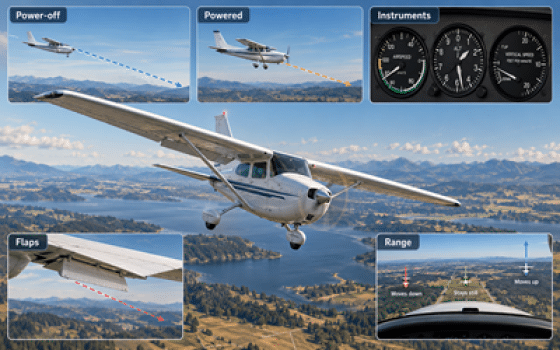
The objective of this practical pre-flight lesson is to prepare you to establish, maintain and recover from an aircraft descent with your flight instructor. You will learn how pitch, power, airspeed and trim work together, how powered and power-off descents differ, how to control the descent path, and how aircraft configuration affects the descent.
What Is an Aircraft Descent?
An aircraft descent is a controlled loss of altitude. The airplane moves down while you control the airspeed, direction and rate of descent.
A Descent Is More Than Lowering the Nose
Reducing power, changing pitch or changing the aircraft configuration can all affect the airspeed and the rate of descent. You use these controls together to produce the descent you want.
Use pitch to set the nose position needed for the desired airspeed.
Power affects how quickly the airplane loses altitude.
Use the correct airspeed for the type of descent and the airplane you are flying.
When the descent is stable, trim the airplane so you do not need to hold constant pressure on the controls.
Power-Off Glide vs. Powered Descent
With little or no engine power, the airplane must lose altitude to maintain airspeed. Pitch is used to maintain the correct glide speed.
With some engine power, you have more control over the airspeed and the rate of descent.
Pitch and Power Work Together
A power change can affect the airspeed and the rate of descent. A pitch change can also affect the airspeed and the descent path.
Make small changes. Wait for the airplane to respond. Then make another correction if needed.
You Will Use Several Types of Descent
Maintain the correct glide airspeed with little or no engine power.
Use pitch and power together to control airspeed and descent rate.
Lose altitude while continuing toward your destination at a useful airspeed.
Use configuration changes, such as flaps, when a steeper descent is needed.
Use the Speeds for Your Airplane
Best-glide speed, descent speeds, flap limits and power settings are different from one airplane to another. Always check the AFM/POH and follow the procedure taught by your instructor.
Before You Descend
Prepare the airplane before reducing power. Check the airspace, know where you want to descend, and set the engine controls for the descent.
Prepare Before Reducing Power
Complete these checks while the airplane is still stable.
Check the airspace in the direction of the descent. Look carefully for traffic below your flight path.
Know the altitude you want to reach and where the descent will take the airplane.
Set the mixture to full rich when this is the correct procedure for your airplane. If descending from a high altitude, enrich the mixture as required. Check the AFM/POH or checklist.
On carbureted airplanes, apply carburetor heat before reducing power when required by the aircraft procedure. Check the AFM/POH or checklist.
Before reducing power, make one final check ahead and below.
Why Check Mixture and Carburetor Heat?
As the airplane descends into denser air, the mixture may need to be enriched. The correct setting depends on the altitude, engine and aircraft procedure.
On a carbureted engine, reducing power can increase the risk of carburetor icing. Use carburetor heat as required by the AFM/POH or checklist.
Look Where the Airplane Is Going
Look for traffic before entering the airspace below you.
Look ahead and understand where the descent will place the airplane.
Decide the selected altitude before you begin the descent.
Check the Procedure for Your Airplane
Not every airplane uses the same mixture or carburetor heat procedure. Some airplanes do not have a carburetor heat control. Always follow the AFM/POH, checklist and your instructor.
Power-Off Descent and Best-Glide Airspeed
In a power-off descent, the engine produces little or no useful power. The airplane keeps flying by losing altitude. Your main jobs are to maintain the correct airspeed, keep the airplane coordinated and watch where the airplane is going.
When Is a Power-Off Descent Used?
A power-off glide is an important part of forced-approach training. You must control the airspeed while choosing where the airplane can safely go.
A power-off descent can also be used when a greater rate of descent is needed and the situation allows it.
What Is Best-Glide Airspeed?
Best-glide airspeed is the speed that allows the airplane to travel the greatest horizontal distance while descending in still air.
If you want to glide as far as possible, maintain the best-glide speed published for your airplane.
How to Establish a Power-Off Glide
Begin from stable flight after completing the pre-descent checks, including mixture and carburetor heat as required.
Smoothly reduce the throttle to the setting required for the exercise.
A change in power can cause yaw. Use rudder and aileron as needed to maintain direction and coordination.
Allow the airplane to slow toward the recommended best-glide speed.
Adjust the pitch until the airplane is close to the recommended best-glide speed. Use the horizon and the nose position as your main visual reference.
Check the airspeed. If it is not correct, make a small pitch change and wait for the airplane to respond.
When the glide attitude and airspeed are stable, trim the airplane to reduce control pressure.
Continue checking for traffic, maintain direction and watch where the airplane is going.
Use the Outside View
When the airspeed is stable, the nose should stay in a similar position relative to the horizon.
Use a reference point ahead to help maintain direction while continuing to scan for traffic.
Watch how points on the ground move in relation to the windshield. Later, this will help you judge whether a point can be reached.
Use Pitch to Control Airspeed
Lower the nose a little. Wait for the airspeed to increase, then stabilize the glide attitude.
Raise the nose a little. Wait for the airspeed to decrease, then stabilize the glide attitude.
Do Not Try to “Stretch” the Glide
Raising the nose too much makes the airplane slow down. Flying below the recommended best-glide speed does not help you travel farther. It also brings the airplane closer to a stall.
Check the Instruments Briefly
Check that the airplane is close to the recommended best-glide speed.
Monitor the loss of altitude while keeping most of your attention outside.
The vertical speed indicator shows how quickly the airplane is descending.
Check that the airplane remains on the intended direction and is not yawing.
During a Long Power-Off Descent
Some aircraft procedures call for periodic use of power during a long power-off descent. Follow the AFM/POH, checklist and your instructor's procedure for the airplane you are flying.
Use the Best-Glide Speed for Your Airplane
Best-glide speed is not the same for every airplane. It can also be different between versions of the same aircraft. Always use the value published in the AFM/POH.
Power-On and Partial-Power Descent
A powered descent uses some engine power while the airplane loses altitude. It gives you better control of the airspeed and the rate of descent. Most normal descents and approaches use some power.
Why Use a Powered Descent?
Keeping some power makes it easier to control how quickly the airplane loses altitude.
Many normal descents and approaches are flown with some engine power instead of with the throttle fully closed.
Use Power and Pitch Together
In a stable powered descent, pitch is used to maintain the desired airspeed.
Power is then adjusted as needed to change the rate of descent.
Pitch and power affect each other, so always check both after making a change.
How to Establish a Powered Descent
Begin from stable flight after checking the area ahead and below.
Set the mixture for the descent. Full rich is commonly used when appropriate, but always check the AFM/POH or checklist for your airplane.
On carbureted airplanes, apply carburetor heat before reducing power when required by the aircraft procedure.
Smoothly reduce engine power to the setting needed for the descent.
A change in power can cause yaw. Use rudder and aileron as needed to maintain direction and coordination.
Allow the airspeed to move toward the desired descent speed.
Adjust the nose position to maintain the desired airspeed.
Check how quickly the airplane is losing altitude. Adjust power if needed.
When the airspeed and rate of descent are stable, trim the airplane to reduce control pressure.
Continue checking traffic, direction and the flight path ahead.
Airspeed and Rate of Descent
If the airplane is too slow or too fast, make a small pitch change. Then wait and check the airspeed again.
Use small power changes to adjust how quickly the airplane descends. Then adjust pitch if needed to keep the desired airspeed.
How to Correct the Descent Rate
Increase power smoothly. Adjust pitch as needed to maintain the desired airspeed. Then wait for the airplane to stabilize.
Reduce power smoothly. Adjust pitch as needed to maintain the desired airspeed. Then check the new rate of descent.
Make Small Changes and Wait
Do not make several large corrections at the same time. Make one small change, wait for the airplane to respond, and then decide if another correction is needed.
What to Check During the Descent
Check that the airplane is close to the desired descent speed.
Check how quickly the airplane is losing altitude.
Know how much farther you need to descend and prepare for the level-off.
Maintain the intended direction and correct any unwanted yaw or turn.
Use the Settings for Your Airplane
Descent speed, power setting, mixture and carburetor heat procedures are not the same in every airplane. Always follow the AFM/POH, checklist and your instructor.
Controlling Yaw During a Descent
A change in power can change the airplane's yaw tendency. Use rudder as required to keep the airplane straight and coordinated.
A Power Change Can Move the Nose Sideways
When you reduce or increase power, the forces acting on the airplane change. The nose may begin to move left or right. This sideways movement is yaw.
Watch a point straight ahead. If the nose begins to move away from that point, use rudder as required to bring it back.
Watch What the Nose Is Doing
The dashed line represents the direction you want to maintain.
The nose is aligned with the point you selected straight ahead.
The nose has moved away from your selected direction.
Use enough rudder to bring the nose back to the selected direction.
Use a point ahead to notice immediately if the nose begins moving left or right.
Use rudder pressure as required to stop the yaw and maintain coordination.
Use aileron as required to keep the wings level or maintain the desired bank.
Use the Slip/Skid Indicator to Confirm Coordination
The ball gives you a simple check. A useful rule is: step on the ball. If the ball is left, press left rudder. If the ball is right, press right rudder.
Use enough left rudder to move the ball toward the center.
When the ball is centered, the airplane is coordinated.
Use enough right rudder to move the ball toward the center.
How to Control Yaw During a Descent
Choose a reference point ahead of the airplane.
Reduce or increase power smoothly as required.
Notice immediately if the nose begins moving left or right.
Apply rudder as required to keep the nose on the selected direction.
Confirm that the slip/skid indicator is centered.
Do Not Memorize One Rudder Direction
The airplane may not always yaw in the same direction after a power change. The amount and direction of rudder required depend on the airplane, power setting, airspeed and flight condition.
En Route Descent
An en route descent is a type of powered descent used to lose altitude while continuing toward your destination, usually at or near cruise airspeed.
Maintain Cruise Airspeed While Descending
In a normal powered descent, you may slow the airplane to a selected descent speed.
In an en route descent, the airplane normally continues at or near cruise airspeed while losing altitude.
Reduce power enough to produce a suitable rate of descent.
Adjust pitch as needed to keep the desired cruise airspeed.
Monitor the altitude and prepare to level off before reaching the selected altitude.
Do Not Exceed Aircraft Limits
As the airplane descends into denser air, airspeed can increase. Monitor the airspeed and stay within the limits published in the AFM/POH.
How to Level Off from a Descent
Do not wait until you reach the selected altitude before you start leveling off. Begin a little early so the airplane reaches the selected altitude as it returns to level flight.
Start Before the Selected Altitude
A useful starting point is about 10% of your rate of descent.
Return to Straight-and-Level Flight
Make the change smoothly. Avoid large or sudden control movements.
Start the level-off before reaching the selected altitude.
Remove carburetor heat before increasing power when this is the correct procedure for your airplane. Check the AFM/POH.
Smoothly increase power toward the setting needed for level flight.
Bring the nose smoothly toward the normal straight-and-level attitude.
The increase in power can cause yaw. Use rudder and aileron as needed to stay straight and coordinated.
Adjust pitch so the airplane stops descending at the selected altitude.
Allow the airspeed to move toward the desired level-flight speed.
Set the power required for the desired straight-and-level airspeed.
Adjust the mixture for the new altitude and cruise power setting. Follow the AFM/POH for your airplane.
When the airplane is stable, trim to reduce continuous control pressure.
The Airplane Needs Time to Stop Descending
The airplane does not stop descending the moment you move the controls. Starting the level-off a little early gives the airplane time to change from a descent to level flight.
Use the Correct Engine Procedure
Power settings, mixture, carburetor heat and other engine controls depend on the airplane. Follow the AFM/POH, checklist and your instructor.
Comparing the Different Types of Descent
The main difference between these descents is how much engine power is used and what airspeed you want to maintain.
| Type of Descent | Power | Airspeed | Main Use | Main Idea |
|---|---|---|---|---|
| Power-Off Descent | Idle or very low power | Best-glide or selected glide speed | Glide practice, forced approach, or when a greater rate of descent is needed | Use pitch to maintain the correct glide airspeed. |
| Power-On Descent | Reduced power | Selected descent speed | Normal descents and approaches | Use pitch for airspeed and power to adjust the rate of descent. |
| En Route (Powered) Descent | Reduced power | Cruise airspeed | Losing altitude while continuing toward your destination | Reduce power enough to descend while maintaining cruise airspeed. |
Descent Instruments
Most of your attention should remain outside. Use the instruments to confirm that the airplane is doing what you expect.
Confirm that the airplane is maintaining the desired descent speed.
The altimeter shows your altitude decreasing during the descent.
The vertical speed indicator shows how many feet per minute the airplane is climbing or descending.
Check that the airplane remains on the intended heading and is not entering an unwanted turn.

Use the instruments for short checks. Keep most of your attention outside.
What Does “500 fpm” Mean?
“500 fpm” means the airplane is losing about 500 feet of altitude each minute while the rate remains stable.
For example, at a steady 500 fpm descent, the airplane loses about 1,000 feet in two minutes.
Look Outside — Then Confirm Inside
Outside picture → airspeed → altitude → VSI → direction → back outside.
Factors Affecting Descent
The rate and distance of a descent can change with power, wind and aircraft configuration.
In a powered descent, a power change affects how quickly the airplane loses altitude.
Less power usually makes the airplane descend faster. More power usually makes it descend more slowly. The exact change depends on the airplane.
Wind can greatly change how far the airplane travels over the ground during a glide.
A headwind reduces the distance you can cover over the ground. A tailwind increases it.
Extending flaps changes lift and drag and allows the airplane to descend more steeply without a large increase in airspeed.
Flaps are especially important during approaches.
Flaps and the Descent Path
Flaps change the way the airplane descends. They increase lift and drag, reduce stall speed, and allow a steeper descent at a lower airspeed.
Extending flaps increases lift and allows the airplane to fly safely at a lower airspeed.
With flaps extended, the airplane can normally fly at a lower speed before reaching the stall.
Flaps allow a steeper descent without allowing the airspeed to increase too much.
The lower nose attitude used with flaps can give the pilot a better view ahead during the approach.

Flaps increase drag and allow a steeper descent at a lower airspeed.
Flap Limits Are Different for Each Airplane
Do not use one flap setting or one airspeed for every airplane. Check the AFM/POH for flap operating speeds, flap settings and approach speeds.
Obstacle Clearance Descents
Sometimes you need a steeper descent path to remain clear of an obstacle ahead.
Descend More Steeply Without Gaining Too Much Airspeed
A steeper descent may use more flap and a lower airspeed than a normal descent.
The goal is to clear the obstacle while maintaining the correct airspeed and a controlled descent path.
The airplane follows a steeper path while continuing toward the selected point ahead.
Flaps can help the airplane descend more steeply without allowing the airspeed to increase too much.
Use the airspeed recommended for the airplane and the configuration you are using.
Check the AFM/POH
Flap settings and airspeeds are different from one airplane to another. Always use the values published for the airplane you are flying.
For obstacle clearance during a short-field approach, see the dedicated lesson.
Estimating Range During a Descent
You can use the movement of a point on the ground to estimate whether the airplane can reach it during a stable descent.
Choose a Point on the Ground
Select a clear point on the ground ahead of the airplane. Watch where that point appears in relation to a fixed point on the windshield.
Keep the descent stable. Maintain a constant attitude and airspeed while you watch the point.

During a stable descent, watch how the selected ground point moves in relation to a fixed point on the windshield.
If the ground point moves down on the windshield, the airplane should reach it and pass over it with altitude to spare.
If the point stays in the same place on the windshield, your present descent path is taking you approximately toward that point.
If the ground point moves up on the windshield, the airplane will normally reach the ground before that point.
Watch How the Point Moves
Moving down = reachable → staying still = current descent path → moving up = not reachable.
The Descent Must Be Stable
This method works only while the airplane maintains a stable attitude and airspeed. If you change pitch, power or airspeed, the descent path changes.
Wind Changes Your Range Over the Ground
A headwind reduces the distance you can travel over the ground. A tailwind increases it.
Keep watching the ground point as the descent continues.
Common Mistakes to Avoid During a Descent
Most descent problems come from poor planning, large control changes, incorrect airspeed or too much attention inside the cockpit.
Before descending, look ahead and below. Make sure the airspace you are about to enter is clear.
Complete the correct engine checks before reducing power. Use mixture and carburetor heat as required by the AFM/POH and checklist.
Make small pitch changes and wait for the airplane to respond. Do not make continuous large corrections.
Do not raise the nose too much to try to reach a point farther away. Maintain the recommended glide airspeed.
Changes in power can cause yaw. Use rudder and aileron as needed to keep the airplane straight and coordinated.
Once the descent is stable, trim the airplane so you do not need to hold constant control pressure.
Keep most of your attention outside. Use the instruments only for short checks of airspeed, altitude, descent rate and direction.
Begin before the selected altitude. If you wait until you reach it, the airplane may descend below the altitude you wanted.
Do not use the same airspeed, flap setting or power setting for every airplane. Follow the AFM/POH.
Gleim Online Ground School for Private Pilots
An online ground-school course for Private Pilot theory review and knowledge-test preparation.
View the Gleim Online Ground School →Affiliate link — StudyFlight may earn a commission from qualifying purchases, at no additional cost to you.
Review Questions
Before practicing descents in the airplane, make sure you can explain the different types of descent, how pitch and power are used, how to maintain the correct airspeed, and how to level off at the selected altitude.
1. What does PAT stand for during a descent?
PAT stands for Power, Attitude, Trim. Reduce or set power, establish the required descent attitude, then trim when the airplane is stable.
2. What is best-glide airspeed?
Best-glide airspeed is the speed that allows the airplane to travel the greatest horizontal distance while descending in still air. Use the speed published in the AFM/POH for your airplane.
3. In a power-off glide, how do you correct the airspeed?
Use pitch. If the airspeed is too low, lower the nose slightly. If the airspeed is too high, raise the nose slightly. Make small corrections and allow the airplane time to respond.
4. How do pitch and power work in a powered descent?
In a stable powered descent, pitch is used to maintain the desired airspeed and small power changes are used to adjust the rate of descent. After any change, check both airspeed and descent rate.
5. What is the main difference between a powered descent and an en route descent?
A powered descent may use a selected descent airspeed. During an en route descent, the airplane normally descends while maintaining cruise airspeed.
6. When should you begin leveling off from a descent?
Begin before reaching the selected altitude. A useful starting point is about 10% of the current rate of descent. At 500 fpm, for example, begin approximately 50 feet before the selected altitude.
7. What effect do flaps have on the descent?
Flaps increase lift and drag, reduce stall speed and can allow a steeper descent without a large increase in airspeed. Always use the flap settings and speeds published for your airplane.
8. What does it mean if a ground reference point moves up on the windshield?
The point is not reachable on the current descent path. If it moves down, it should be reachable with altitude to spare. If it stays in the same place, your current descent path is taking you approximately toward it.
Can You Explain the Procedure From Memory?
Before getting into the airplane, you should be able to explain how you will prepare for a descent, set mixture and carburetor heat as required, establish a power-off or powered descent, maintain the correct airspeed and coordination, monitor the descent, and level off smoothly at the selected altitude.